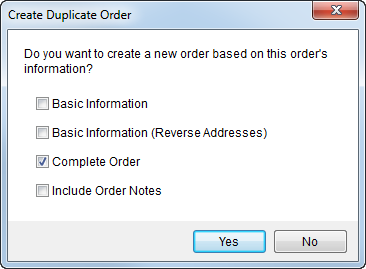
The Create Duplicate Order dialog appears when users choose the Duplicate Order option from the New menu (available from the Order-Level Functions). This function allows you to create a new order based on the data of the order currently accessed in MoversSuite. The options available through this dialog allow you to choose what level of data is copied to the new order.
Figure 8: Create Duplicate Order dialog
The following table describes the options available from within this dialog.
|
Option |
Description |
|
Basic Information |
Choosing this option instructs the application to only copy the basic data of the order to the new order. See the Basic Information data section below for a listing. |
|
Basic Information (Reverse Addresses) |
Choosing this option instructs the application to only copy the basic data of the order to the new order and switch the Moving From address with the Moving To – Primary address. See the Basic Information data section below for a listing. |
|
Complete Order |
Choosing this option instructs the application to copy a majority of the data to the new order. See the Complete Order data section below for a listing. |
|
Include Order Notes |
Checking this box instructs the application to copy all Notes associated to the copied order to the new order. This option works with any of the above options. |
|
|
Yes Pressing “Yes” creates a duplicate order using the same data as the opened order. |
|
|
No This option cancels the request and closes the dialog. |
Basic Information data
The following table lists the data copied to a new order when the Basic Information or Basic Information (Reverse Addresses) option is selected. When is Basic Information (Reverse Addresses) selected, the application switches the Moving From address with the Moving To – Primary address.
|
Tab |
Field |
|
Note: The application copies additional data not readily visible within MoversSuite, such as whether the record is an order, a foreign order, a lead, van line assignment, etc. | |
|
| |
|
Branch | |
|
| |
|
Order Status | |
|
Last Name | |
|
First Name | |
|
| |
|
Phone Numbers (all) | |
|
Task Definition | |
|
Task Group | |
|
Salesperson | |
|
Transportation Coordinator | |
|
Logistics Coordinator | |
|
Moving From (complete address) | |
|
Moving To - Primary (complete address) | |
|
Moving To - Secondary (complete address) | |
|
Consignor (all fields) | |
|
Consignee (all fields) | |
|
| |
|
|
Shipment Details > (all except Product Code, Product Type, Number of Pieces and detailed items) |
|
Shipment Details > Trade Show Information (all) | |
|
Special Instructions | |
|
Directions | |
|
Created On (Created By) | |
|
Type of Move | |
|
Commodity | |
|
Authority | |
|
Service Type | |
|
Shipment Type | |
|
| |
|
|
Pre-sold/Non-sold |
|
| |
|
Customer | |
|
Bill To Address (all) | |
|
National Account > Account | |
|
National Account > Name | |
|
National Account > Memo | |
|
Tariff/Rate | |
|
Section | |
|
Discount | |
|
Contract | |
|
Estimate Amount | |
|
Team Pay | |
|
Invoice Requirement | |
|
| |
|
|
Account Profile (populates all other tab data when set) |
|
| |
|
|
If the Include Order Notes flag was checked when the duplicate order was created, then all notes from the previous order are copied to the new order. |
|
|
Last Name |
|
First Name | |
|
| |
|
Phone Numbers (all) | |
|
Customer (including Bill To Address) | |
|
Moving From | |
|
Moving To (Primary and Secondary) | |
|
Revenue Clerk | |
|
Type of Move | |
|
Commodity | |
|
Authority | |
|
Shipment Type | |
|
Tariff/Rate | |
|
Contract | |
|
Invoice Requirement | |
Complete Order data
Listed below is the data copied when a new order is created using the Duplicate Order functionality. This includes fields and data behind sub-tabs and buttons within each listed tab (except where noted).
|
Tab |
Description |
|
All data copied except: Estimate Number | |
|
All data copied except: Related Order Self Haul information Booked date Created On date | |
|
All data copied | |
|
All data copied except: Van Line Registration Date Van Number By | |
|
All data copied except: Recurring Billing data | |
|
All data copied except: Other Information (Revenue Clerk, Bill Date, Hauling Documents Received) Thrid Party Services | |
|
All data copied | |
|
All data copied | |
|
All data copied if the Include Order Notes option is checked. | |
|
All data copied | |
|
Tasks regenerated based on Task Definition |
RELATED TOPICS:
Change a MoversSuite Order Number or Branch

