MoversSuite Administration > Administration > Order Number
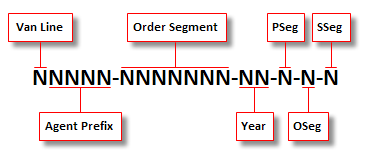
Order Number definitions are assigned to Move Types and are used to control the look and numeric sequence of the MoversSuite Order Number. MoversSuite Order Numbers are comprised of several elements, all of which are defined within this setup with the exception of the segment data (Partial, Overflow, Set-off) that is supplied by a third party interface, if applicable.
Figure 58:MoversSuite Order Number format
Use the table below to define the format of Order Numbers used within MoversSuite. These will be assigned to Move Types (see Move Type Setup) which, in turn, are linked to order records in MoversSuite.
Valid characters for use in the Order Number include the following:
|
Character(s) |
Description |
|
a-z |
All lowercase letters from ‘a’ to ‘z’ are accepted. |
|
A-Z |
All lowercase letters from ‘A’ to ‘Z’ are accepted. |
|
- |
A hyphen is accepted. |
|
Field |
Description |
|
Description |
Provide a name of the Order Number record (up to 25 characters). The description entered will be available within Move Type Setup. |
|
Prefix |
Enter an agent prefix of the Order Number (up to 4 characters). |
|
Minimum |
Enter the minimum value that the Order Segment portion of the Order Number can be. This is the starting count of the Order Number assignment in MoversSuite (up to 10 digits). The Minimum and Maximum values are used to specify a particular range that new orders will be assigned to for this Order Numbers record. |
|
Maximum |
Enter the maximum value that the counter portion of the Order Number can be (up to 10 digits). |
|
Year Length |
Enter the number of digits that the will be incorporated into the Order Number (1 to 4 digits). The Year Length field will determine what number of digits of the year display within the Order Number. The count of Year Length will be taken from Current Year beginning from the right. Example: Entering a Year Length of “2” will display the Current Year value of “2009” as “09” within the Order Number. |
|
Next Year |
Enter the next year to be incorporated into the Order Number (1 to 4 digits as determined by the Year Length setting). This value is assigned to orders created in the current year for the following year. |
|
Current Year |
Enter the current year to be incorporated into the Order Number (1 to 4 digits as determined by the Year Length setting). |
|
Next Number In Sequence (Current Year) |
Enter the next value to be assigned to the Order Segment portion of the Order Number. The value entered here will typically be within the range specified by the Minimum and Maximum values (up to 10 digits). |
|
Next Number in Sequence (Next Year) |
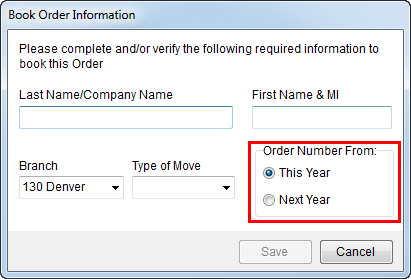
Enter the starting value to be assigned to the Order Segment portion of the Order Number when orders are booked for the following year (up to 10 digits). The option to book an order for the following year is found within the Book Order dialog as the Order Number From setting:
Figure 59: Book Order Information dialog
See Book Order Information for usage. |
|
Van Line |
Select a van line from the available list. Selecting a van line will automatically associate orders booked under this type to the specified van line. Define van lines records using Van Line Setup. |
RELATED TOPICS:
Change a MoversSuite Order Number or Branch
Order Number Setup