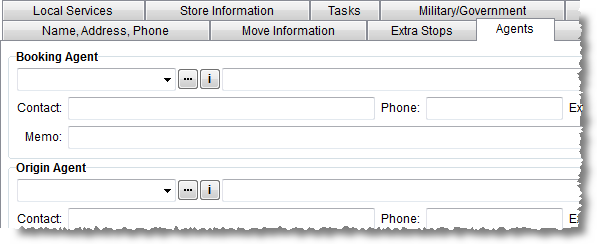
Use the Agents tab to link van line agents to an order. Additionally, contact information for the agent can be updated on a per order basis.
Figure 37: Agents tab
Described below are the fields and functions available within the Agents tab.
Note: The contact, phone number, phone extension, and memo fields can all be updated. Changes made to these fields will be attached to the order and will not affect the record stored within Agent Setup.
|
Field/Function |
Description | ||||||||||||||
|
Booking Agent |
| ||||||||||||||
|
Booking Agent |
Selected the agent responsible for booking the order
from the available list defined within Agent Setup. Use the Agent Find ( The drop-down selector includes sortable columns for the Agent ID, Agent Name, and Van Line affiliation. Reference Agent Information (
| ||||||||||||||
|
Agent Name (and Location) |
The name of the selected agent displays along with the city, state, and postal code of the agent.
| ||||||||||||||
|
Division |
Select a division from the list, if present. See Divisions for more information. | ||||||||||||||
|
Fax |
Enter/update the fax associated to the Origin Agent.
| ||||||||||||||
|
Memo |
Additional contact information or other pertinent data (up to 60 characters) can be set in the memo area. Common usages for this field are to store a fax number, old addresses, or email address(es).
| ||||||||||||||
|
Origin Agent |
| ||||||||||||||
|
Origin Agent |
Selected the agent where the order originated from. Use
the Agent Find ( The drop-down selector includes sortable columns for the Agent ID, Agent Name, and Van Line affiliation. Reference Agent Information (
| ||||||||||||||
|
Agent Name (and Location) |
The name of the selected agent displays along with the city, state, and postal code of the agent.
| ||||||||||||||
|
Division |
Select a division from the list, if present. See Divisions for more information. | ||||||||||||||
|
Fax |
Enter/update the fax associated to the Origin Agent.
| ||||||||||||||
|
Memo |
Additional contact information or other pertinent data (up to 60 characters) can be set in the memo area. Common usages for this field are to store a fax number, old addresses, or email address(es).
| ||||||||||||||
|
Haul As |
For the Hauling Agent only, users can select a type from this drop-down to reflect the hauling as van line authority, agent authority, etc. (see Haul As Setup). | ||||||||||||||
|
|
| ||||||||||||||
|
OA Coordinator |
Select the coordinator assigned by the origin agent to be responsible for the move.
Note: Employees are available within this menu when they have a Status of ACTIVE and Labor Type of “Coor” in their Personnel Setup.
| ||||||||||||||
|
OA Surveyor |
Select the salesperson performing the survey for the origin agent. This is the surveyor assigned by the origin agent to be responsible for surveying the move request. If the Origin Agent is not a sister agency, then the application clears the OA Surveyor field.
Note: Employees are available within this menu when they have a Status of ACTIVE and Labor Type of “Sales” in their Personnel Setup.
| ||||||||||||||
|
|
OA Surveyor Calendar | ||||||||||||||
|
Other Surveyor |
Enter the name of a surveyor not affiliated to an agent (up to 32 characters). | ||||||||||||||
|
Survey Date |
Enter the date that the survey is anticipated to take place on (or the time it took place on).
See Date Fields for data entry options. | ||||||||||||||
|
Survey Start Time Survey End Time |
Enter the time or time range that the survey is anticipated to take place on (or the time it took place on).
See Date Fields for data entry options. | ||||||||||||||
|
OA Order |
Set if the order was Pre-sold by the origin agent or Non-sold (competitive bid). | ||||||||||||||
|
|
| ||||||||||||||
|
Van Line Registration Date |
Enter the date that the order was registered on the van line system. See Date Fields for data entry options. | ||||||||||||||
|
By |
Enter the person responsible for registering the order on the van line system (up to 26 characters). | ||||||||||||||
|
Van Number |
Number used to identify the van assigned to the order (up to 12 characters). This field will automatically fill-in with the van number of the driver assigned to the order through Long Distance Dispatch. The value is from the Van # field from the Personnel Setup record of the long distance driver. |
RELATED TOPICS:
 ) for advanced search options.
 ) for detailed information on the
selected agent.
) for detailed information on the
selected agent.