The System ID is a four-character identifier that, when set for a document in the Report Setup, will
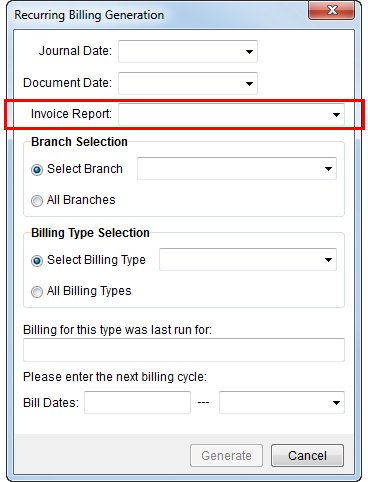
Instruct the application to render a particular document through a button or report field, such as the Print Label button available through Name, Address, Phone and the Invoice Report in Recurring Billing Generation.
Figure 8: Invoice Report field in Recurring Billing Generation
The following table lists the System Report ID Setting and describes the functionality it represents.
|
Note |
|
In most cases, the application allows a single document assignment to a System ID, with the following exceptions; the application allows Report Setup to reference the following System ID values for one or more reports; the following produce a menu of reports associated to the related functionality. CLAM INTL MILT QUOT REVI RSBI The multiple document menu functionality works with all Report Type values (Reporting Services, Letters, Crystal), except REVI and RSBI, which will only work with Report Type of “Reporting Services.” |
|
Important |
|
Many System ID values require an internal report parameter. For example, the System ID of “HLAB” (Print Label) will pass the Order ID of the open order as an argument to the report. Errors will result if the report does not accept the data sent from the application. |
|
System ID |
Text |
Location |
|
CASH |
Print Receipt button |
|
|
CLAM |
Reports/Letters button (menu) |
|
|
CSMR points to the report producing the individual statements while CSMS points to the summary report of the statement run (included with the individual statements). | ||
|
CSMR |
Create New Statement and View button |
|
|
CSMS |
Create New Statement and View button |
|
|
GLES |
VL Distributions button |
|
|
INTL |
Forms button (menu) |
|
|
LABL |
Print Label button |
|
|
MILT |
Military Forms button (menu) |
|
|
PBER |
Generate Transactions button |
|
|
PDEP |
Deposit Report button |
|
|
QUOT |
Report/Letters button (menu) |
|
|
REVI |
Invoice Report field |
|
|
RSBI |
Invoice Report field |
|
|
STMT |
Generate button |
|
|
WORK |
Work Ticket button |
|
The following table lists the standard reports provided by MoversSuite assigned to System ID values.
|
System ID |
Report |
|
CASH |
|
|
CLAM |
|
|
CSMR |
|
|
CSMS |
|
|
GLES |
|
|
INTL |
|
|
MILT |
|
|
LABL |
|
|
PBER |
|
|
PDEP |
|
|
QUOT |
|
|
REVI |
Standard Invoices (long) |
|
RSBI |
Standard Invoices (short) |
|
STMT |
|
|
WORK |