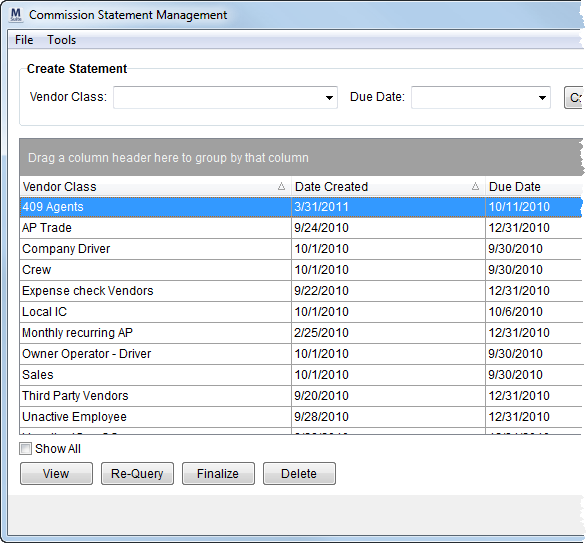
The Commission Statement Management provides a tool to create statements of vendor commissions for vendors maintained in the Account Payables system in Microsoft Dynamics GP. The statements detail the commission transactions and offer a summary by vendor for each vendor class. Users can reproduce past statements or generate a historical summary, as well.
Figure 1: Commission Statement Management screen
The Commission Statement Management screen offers a Tools menu with an option to create a report of commissions paid to a particular vendor for a given date range through Build Historical Statement (hotkey: ALT + T + B).
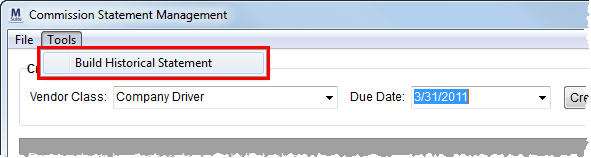
Figure 2: Build Historical Statement option
See Commission Statement Report for more information on this report.
The following table describes the fields and functions available within Commission Statement Management.
|
Field/Function |
Description |
|
Create Statement |
Use this section to generate customer statements for a particular vendor class and due date. |
|
Vendor Class |
Select a vendor from this list of those defined within Microsoft Dynamics GP. |
|
Due Date |
Enter a date to select records based on statement document cut-off date. |
|
|
Create New Statement (Alt+N) This function creates a commission statement for all vendors associated to the selected Vendor Class based on all open documents up to the specified Due Date. |
|
Data Grid |
This section lists generated commission statements. |
|
Vendor Class |
The class name of the statement displays in this column. |
|
Date Created |
The date that the statement was created on displays here. |
|
Due Date |
This column displays the cutoff date selected for the commission statement run. |
|
Final |
A checkmark appears in this column if the associated statement is finalized. |
|
Show All |
Selecting this option will display all available commission statements in the data grid. By default, the data grid only displays non-finalized statements and the last finalized statement for each vendor class. |
|
|
View (Alt+V) Opens an existing commission statement report for the selected class through the Report Viewer. |
|
|
Re-Query (Alt+R) This function will check for any open transactions in the AP system in Microsoft Dynamics GP for all vendors associated to the selected Vendor Class and will update MoversSuite accordingly. The application will produce a commission statement upon completion of the update and display it using the Report Viewer. |
|
|
Finalize (Alt+Z) This function creates a balance forward entry for the selected statement and places it in a finalized state. Finalized statements will display a checkmark in the Final column. Note: The last finalized statement for each vendor class will display in the data grid regardless of the Show All option. |
|
|
Delete (Alt+D) This function permanently removes a non-finalized statements after the prompting the user to confirm the request. |
|
|
Close (Alt+C) This function closes the screen. |
RELATED TOPICS:
Commission Plan Details Report
Employee Commission Plans Report



