MSWeb > Tasks tab
|

|
MSWeb
Tasks is based within the order level tasks; however, the
features and functions are the same within MSWeb Global Tasks. Click the
name to view.
Also, MSWeb
Task Filters details the use and parameters when using Task
Filters within Global Tasks.
Both videos are located within the Training Center > MSWeb
section located here.
|
Accessing Tasks
as indicated in Figure 12 opens the webpage that allows the
viewing and management of tasks for all orders. To access this page, you must
have at least one branch assigned to the “Tasks” security module (see Security Modules). Functionality related to each task is
based on security access to the “Order Information” module; therefore, if you
have read-only access to the branch of the order associated to the tasks, then
you can view those tasks but not edit them. If you have full access the branch,
then you can make updates to them. The one exception to this rule is that you
can update any tasks to which you are assigned.
Global Tasks
references the webpage within MSWeb that
lists, has filtering, and a search for tasks across all orders. Global Tasks is:
• the webpage is accessed from the Tasks
tab in the header, as indicated in Figure 12.
• a list of tasks from all orders – not
just the one order as is the case within MSWeb Tasks.
• includes only tasks that have both
their Due Date and the Assigned To set.
• managed using the same menus, filters,
and selectors as MSWeb
Tasks.
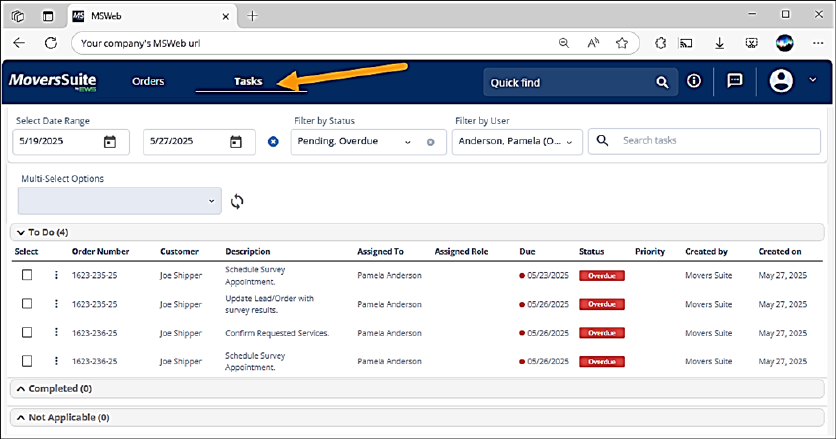
Figure
12: Global Tasks
For details on
using global messages, see:
MSWeb Task Filters
MSWeb Multi-Select Options
MSWeb Add Task
MSWeb Copy Task
MSWeb Edit Task