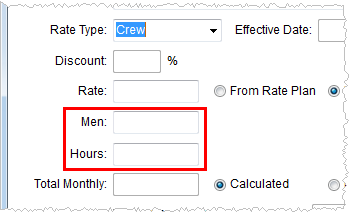
The Rating Systems provide a company with a flexible and versatile means of applying rates automatically for a variety of products including imported revenue, transportation linehaul, recurring billing, quote generation, applying tariffs, etc.
The system utilizes the Rate Plans in conjunction with Item Codes to determine rates. Additionally, a company can employ an Advanced Rating feature to base rates on a number of order elements including cubic feet, miles, and weight.
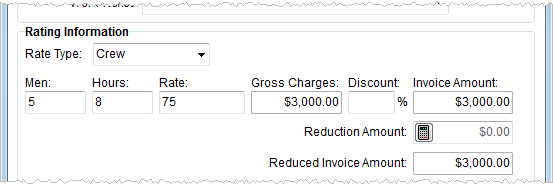
Figure 1: Rating Information from Add Revenue Item
Rate Plans assigned to the order drive the rating system by linking the order to available rates, which in turn provide the specifics needed to compute a rate based on effective dates, rate types, rate matrix, etc. Additionally, a Rate Plan links an order to van line support tariffs.
Clerks will have the opportunity to enter rating data by hand in several places such as Add Billing Item.
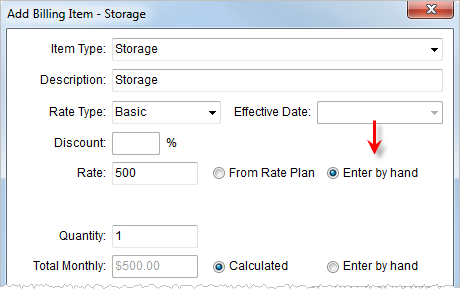
Figure 2: Add Billing Item screen
Users set the Rate Plan for an order as whole within the Tariff/Rate field in Billing Information.
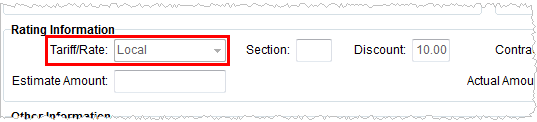
Figure 3: Rating Information in Billing Information
The Rate Table within the Billing Record allows a user to assign a Rate Plan to a Recurring Billing record.
Optionally, a company can set the Rate Plan based on the Account Profile of the order. See Account Profiles for more information.
The following functional areas apply Rating information directly:
Rating Fields
|
Field |
Description |
|
Rate Plan |
The Rate Plan defined in Rate Plan Setup is set at the order level within the Tariff/Rate field in Billing Information and set for within the Rate Table for a Billing Record. The application retrieves rating information based on the Rate Plan and Item Code to for a quote, revenue item, or charge to a particular rate. |
|
Rate Type |
The Rate Type provides the user with options that determine which field labels appears for the quantity fields and the labels that appear on invoices in addition to the setting a divisor (see Rate Type Setup for more information). |
|
Quantity |
The application bases dynamic quantity fields appearing in rated information on the selected Rate Type.
Figure 4: Add Billing Item screen
|
|
Rate |
The Rate is the actual percentage value used in calculating quotes, revenue items, and charges. The application will set this value based on the Rate Plan and Item Code, which determine which Rate Plan Setup record to use. |
|
Item Code |
The application uses the Item Code to generate accounting transactions. Users assign the Item Code using a variety of labels for each specific need, such as Item Type, Service Code, Item, Item Code, etc. |
|
Effective Date |
The date that a rate is in effect is determined through the Rate Plan Setup, which instructs the application to use a rate that is in within a predefined date range as compared to the Load Date, System Date, or Effective Date (entered within Add Billing Item). |
|
Order Information |
The Advanced Rating Systems determines a rate based on one or two of the following order-related data: Cubic Feet, Linear Feet, Miles, and Weight. See Rate Type Setup for information on data values being pulled into rating. |