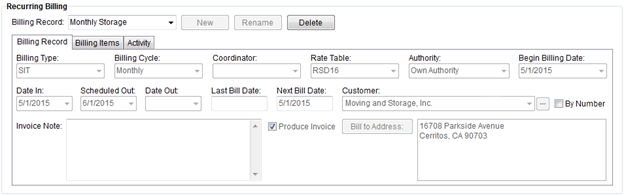
Available through the SIT/Recurring Billing tab, the Recurring Billing section allows a user to establish billing records that will be included in a billing generation performed within Recurring Billing Management.
Users will select a Billing Record from the list of those created for the order or create a new record and then use the Billing Record tab to set the general attributes of the billing and use Billing Items to define the individual charges that comprise the billing. The Activity tab allows the user to view all changes made (see Activity (Recurring Billing)).
Figure 3: Recurring Billing section
The following table describes the general functions available within Recurring Billing.
|
Function |
Description |
|
Billing Record |
Select a Billing Record Select a record from the list of those defined for the order. Data will change within the Billing Record, Billing Items, and Activity tabs to reflect the currently selected billing record. |
|
|
New (Alt+N) This option will open a prompt where the user can enter the name of a new billing record for the order (up to 64 characters). |
|
|
Rename (Alt+D) This option will open a prompt where the user can enter a new name of athe selected billing record (up to 64 characters). |
|
|
Delete (Alt+D) This function will delete the open record after prompting the user to confirm the request. The application cannot delete records that have transaction posted against it. Users attempting to delete such records will receive the following error: “Unable to delete records that have been posted.” |


