 ) is clicked.
Date fields in MoversSuite can be entered directly by typing
the date in MM/DD/CCYY format or by selecting the date through a
drop-down calendar that appears when the drop-down button () is clicked.
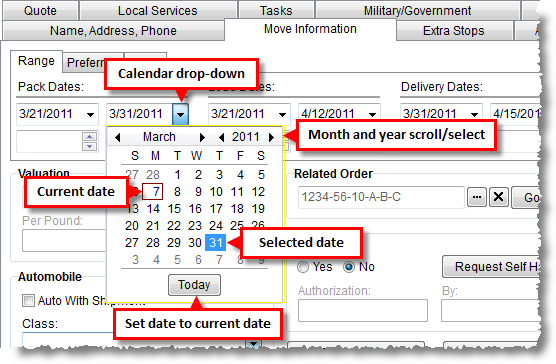
Figure 30: Date field features
Date fields contain the following features.
|
Feature |
Description |
|
Keywords |
Ability to generate a date based on an entered keyword. Entering Friday, for example, will insert the date corresponding to Friday of the current week. See Date Field Keywords for more information. |
|
Month and Year Scroll Select |
Users can scroll through the calendar by month and year
by clicking the previous month/year button ( |
|
Date Highlight |
The current date will appear highlighted in red ( |
|
|
Today Pressing the Today button will automatically set the date value to the current date and close the drop-down calendar. |
RELATED TOPIC:
 ) or next month/year button (
 ).
). ) on the drop-down calendar and if a
date was already a selected value for the field it will appear in a blue
and white box (
) on the drop-down calendar and if a
date was already a selected value for the field it will appear in a blue
and white box ( ).
).