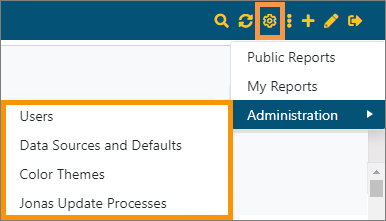
BI Tool > Settings > Administration
NOTE: The options available within Administration are determined by the user’s security access, which is set within Administration > Users and settings within MoversSuite EnterpriseBI User Information Setup and EnterpriseBI User Setup.
Use Administration to access Users, Data Sources and Defaults, Color Themes, and Jonas Update Processes menu options.
Figure 23: Settings > Adminstration
For details on Users, please refer to BI Tool User Administration. Use Users to manage user permissions and login information.
For details on Data Sources and Defaults, please see BI Tool Data Sources and Defaults Administration.
For details on Color Themes, please refer to BI Tool Application Color Themes.
For details on Jonas Update Process, please refer to BI Tool Jonas Update Processes.
RELATED INFORMATION:
BI Tool Assigning Access to Business Categories
BI Tool Assigning Access to Reports
BI Tool Assigning Administrator
BI Tool Disabled
BI Tool Security and Permissions