
|
Version 5.34 |
RELEASE SUMMARY
The following is a table contains counts of the items affecting this release.
|
# |
Change Summary |
|
2 |
Release Requirements |
|
1 |
Known Issues |
|
3 |
Release Enhancements |
|
1 |
Release Fixes |
|
5 |
Schema Changes (Database Schema Tables Affected) |
|
2 |
Admin Changes |
|
0 |
Standard Reports Affected |
RELEASE REQUIREMENTS
Please read the following announcements regarding functionality and hardware/software changes for this release of MoversSuite.
IMPORTANT RELEASE REQUIREMENTS
MoversSuite is compatible with the following:
Microsoft Dynamics GP 2015 R2 (with ATIP Build 14.0.1)
Microsoft Dynamics GP ATIP Build 14.0.1
Refer to the following for information regarding additional requirements you may need to support Microsoft Dynamics GP 2015:
System Requirements for Microsoft Dynamics GP 2015
View the MoversSuite Compatibility topic for a list of products compatible with MoversSuite.
The following requirements are needed for this release:
Microsoft Dynamics GP 2013 R2 (with ATIP Build 12.0.23)
Microsoft Dynamics GP ATIP Build 12.0.23
Refer to the Hardware Requirements topic in our System Requirements for more information on the requirements for Microsoft Dynamics.
KNOWN ISSUES
The following issues are known problems that may affect your decision to upgrade to this version of MoversSuite. The following are not fixed for this release.
Citrix issue with phone number control
An issue that cannot be replicated is causing the phone numbers within the Shipper Contact Information section (Name, Address, Phone tab) to disappear and then reappear when a user clicks on that section, however, the user cannot edit them until they press Cancel (on the order) and then attempt to Edit again. (6409)
RELEASE ENHANCEMENTS
This section lists the enhancements made to MoversSuite for this release.
VIDEO: MoversSuite 5.34 Overview Video
Watch this video to see an overview of the changes we made at this release.
QuickBooks Integration
Moving companies that utilize QuickBooks Online for their accounting functions can take advantage of a MoversSuite integration that allows the company to create revenue items within MoversSuite and send them to QuickBooks for accounting transaction generation and other financial functions.
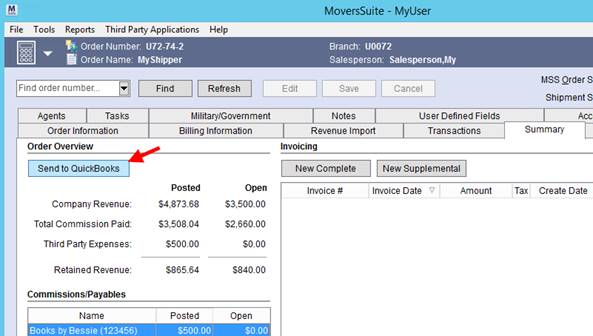
Figure 1: Summary tab
|
SUMMARY (7548) |
|
QuickBooks Integration is now available. |
|
The following areas have been affected by this enhancement: QuickBooks Integration Setup and Administration
|
Required Fields
Many of you have requested that MoversSuite provides a way to make certain data fields required for an order. With this release, your company can now define which fields must be set based on particular events that occur, such as creating or booking an order.
A new administrative setup area allows your company to define which fields it wants required at certain points in the workflow process. In the image below, the example illustrates that the Type of Move, Commodity, and Authority of the order must be set when the order is created.
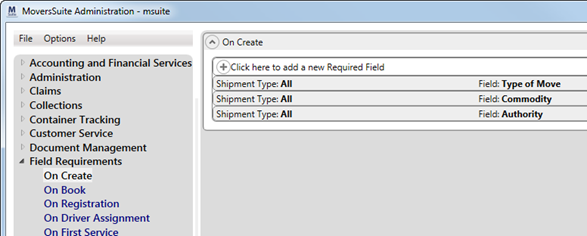
Figure 2: Field Requirements in MoversSuite Administration
When a user in MoversSuite attempts to create an order and any of these fields are not set, then the application returns an error dialog and highlights the required fields in red.
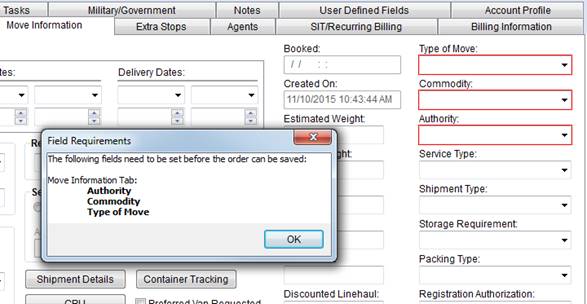
Figure 3: Field Requirements dialog and highlighted required fields
The requirements affect only orders managed through the move modules, such as Order Information and Revenue Entry. They do not affect imports from van line interfaces nor do they affect other API processes. Of note, once an order has been imported into MoversSuite, the field requirements do take effect.
There is no user security associated to Required Fields functionality.
Please see the Required Fields topic for more information.
|
SUMMARY (7634) |
|
Required Fields is now available. |
|
The following areas have been affected by this enhancement:
|
Container/Crate counts added to Local Dispatch
The Dispatch Center grid in Local Dispatch now displays the four new columns that capture the total count of order and service containers on the service as well as the total order and service crates.
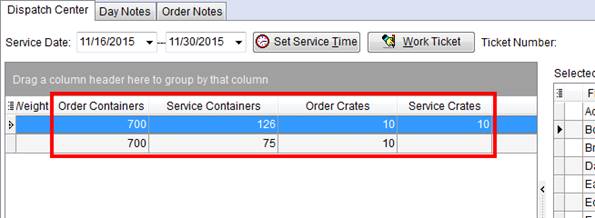
Figure 4: Dispatch Center grid
The following table describes the new columns added to Local Dispatch.
|
Fields |
Description |
|
Order Containers |
Displays the count of the estimated cartons set for the order through the Update Containers, Packing and Unpacking screen accessed through the Move Information tab. |
|
Service Containers |
Displays the count of the estimated cartons set for the service through the Update Containers, Packing and Unpacking screen accessed through the Add Local Service screen (through the CPU button). |
|
Order Crates |
Displays the total of all crates specified for the order through the Update Containers, Packing and Unpacking screen accessed through the Move Information tab. |
|
Service Crates |
Displays the total of all crates specified for the order through the Update Containers, Packing and Unpacking screen accessed through the Add Local Service screen (through the CPU button). |
|
SUMMARY (7727) |
|
Four columns added to the Dispatch Center tab to document the total order/service containers and crates. |
|
The following areas have been affected by this enhancement:
|
RELEASE FIXES
This section lists any fixes made to MoversSuite for this release.
Revenue Entry Fixes
Group Functions not producing error
The Group Functions option no longer produces an access violation when evoked and no records exist within the Transactions grid. (7761)
SCHEMA CHANGES
The following link allows you to navigate through all MoversSuite tables and allows you to view field properties, such as type and maximum value size.
Interactive MoversSuite database schema (5.34)
MORE INFORMATION
Here we have a few handy links to assist you.
Support
View our Support page for information on other releases, to log an incident, and more…
System Requirements
View the System Requirements topic for a list of hardware and software requirements for this release.
Product Suggestions
Have any thoughts on how we can make MoversSuite better? Please feel free to contribute using our Product Suggestions site.
Past Versions Information
See Past Versions Information for highlights of this and other releases.