MoversSuite provides the ability for a moving company to utilize QuickBooks Online Accounting to provide financial transactions and reporting while managing move requests through MoversSuite.
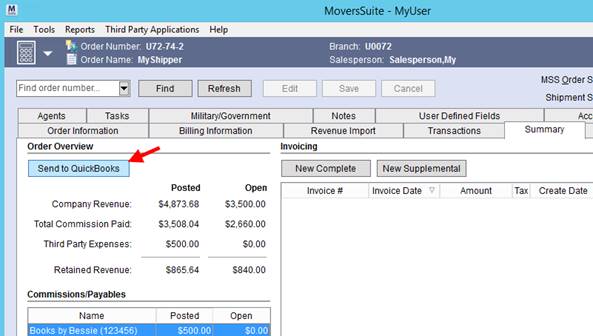
Perform all the move requirements within MoversSuite, such as booking the move, dispatching crew, and creating revenue items through Transactions. Then send the revenue to QuickBooks Online Accounting using the Send to QuickBooks option within the Summary tab.
Figure 1: Summary tab
When Send to QuickBooks is pressed, accounting transactions are generated and are available within QuickBooks Online Accounting. Specifically, the Customers and Vendors listings for your account display the revenue and expense items from MoversSuite.
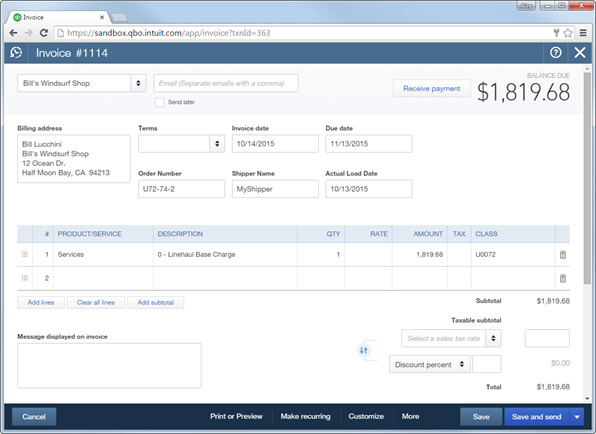
Figure 2: Customer invoice in QuickBooks Online Accounting
MoversSuite utilizes several fields on invoices associated to your QuickBooks customers and vendors. Custom fields that display on a customer invoice include the Order Number, Shipper Name, and Actual Load Date of the move.
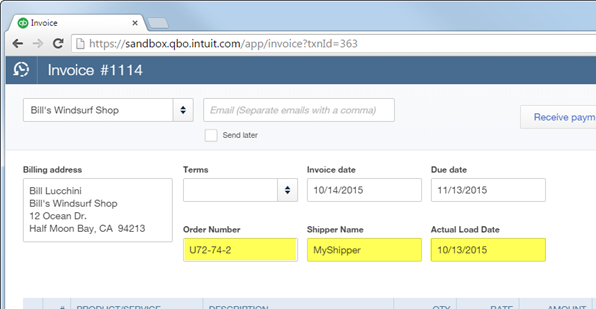
Figure 3: Customer invoice in QuickBooks Online Accounting
The following table lists the visible QuickBooks fields that store reference data from a MoversSuite order.
|
QuickBooks Customer Invoice Field |
MoversSuite Data |
|
Order Number |
|
|
Shipper |
Last Name/Company Name from Name, Address, Phone |
|
Actual Load Date |
Load Date from the Actual tab in Move Information |
|
QuickBooks Vendor Invoice Field |
MoversSuite Data |
|
Reference Number |
Invoice Number from Add Third Party Item (Revenue Entry) |
|
Memo |
First Name and Last Name/Company Name from Name, Address, Phone and Order Number |
MoversSuite imports customers, vendors, and service items from QuickBooks and makes them available to be assigned to orders. The following table details the available assignments.
|
QuickBooks Item |
MoversSuite Assignment |
|
Customers |
Assigned to an order through the Billing Information and the Billing Information (Revenue Entry) tabs. |
|
Vendors |
Assigned to employees through the Accounting tab within their Personnel Setup. |
|
Products and Services |
Link to MoversSuite item codes through the Revenue Item Mapping within the QuickBooks Item Mapping Setup. |
|
Chart of Accounts |
Link to MoversSuite item codes through the through commissions and expenses assignments within the QuickBooks Item Mapping Setup. |
If your company utilizes branch accounting in QuickBooks, then you can reference the Class within QuickBooks to distinguish between branches when generating reports, such as the Profit & Loss Report.
Another integrated feature is the use of the Memo field. MoversSuite stores the invoice number associated to expenses in the Memo field under your Vendors.
Refer to QuickBooks Integration Transactions for information on the type of transactions generated and referenced data.