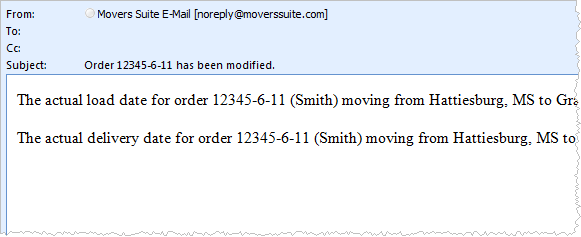
As part of Account Profile functionality, the application notifies all account contacts with an email when the Actual Load or Actual Delivery date on associated orders is set, changed, or removed.
Figure 7: Monitor Orders Service message
The message is sent upon an order Save. The application includes all related date changes since the last Save in one email notification.
The following template contains an outline of the messages that contacts will receive through the Monitor Orders Service (examples follow table).
Subject:
Order <order number> has been modified.
Message Template:
The actual [“delivery” | “load”] date for order <order number> (<shipper last name>) moving from <moving from city, state> to <moving to city, state> on PO <purchase order> has been set to [<date>”.” | “removed.” | “changed from” <old date> “to” <new date>”.” ]
With data pulled from the following locations.
|
Template Value |
Description |
|
<order number> |
This value displays the Order Number of the record. |
|
<shipper last name> |
The contents of the Last Name/Company Name field in Name, Address, Phone displays. |
|
<moving from city, state> |
The Moving From City and State within Name, Address, Phone displays. |
|
<moving to city, state> |
The Moving To - Primary City and State within Name, Address, Phone displays. |
|
<purchase order> |
The Purchase Order Number within Billing Information displays. |
|
<date>, <old date>, <new date> |
Either the Load Date or Delivery Date set in within the Actual tab in Move Information displays. |
The following is an example where the load date is set.
The actual load date for order 12345-6-11 (Smith) moving from Hattiesburg, MS to Grand Junction, CO on PO 33390 has been set to 07/05/2011.
The example below is where a user has changed the delivery date:
The actual delivery date for order 12345-6-11 (Smith) moving from Hattiesburg, MS to Grand Junction, CO on PO 33390 has been changed from 07/05/2011 to 07/04/2011.
To enable the Monitor Orders functionality, the system must have the correct SMTP Setup and Database Mail Setup values along with having the Monitor Orders flag set for appropriate contacts within Account Profile Setup. See Email Services Setup and Administration for more information.
RELATED TOPICS:
Email Services Setup and Administration