Field
Description
Service
Enter the name of the service (up to 30 characters).
Example:
Auxiliary Service
Commercial Delivery
Commercial Move
Deliver
Driver Assist
Load
Non-Revenue
Pack
Pack/Load
Pack/Load/Deliver
Service Cancelled
Storage
Unpack
See Add Local Service for reference and usage.
Service Type Group
After defining all Service Types, select a group to report the type under from the list of records defined within Service Type Group Setup.
Units
Select “Weight (lbs)” if the service is measured by weight or “Cartons” if the service is measured by cartons.
The Units setting generally affects the choice for Labor type and whether the Average Cartons Per Hour or the Average Weight Per Hours is needed. In general, if the Units is “Carton” then the Labor Type is expected to be that of a packer and if Units is “Weight (lbs)” then the Labor Types is expected to be that of a mover.
See Add Local Service for reference and usage.
Labor Type
NOT IN USE
Item Code
If the Service description links to imported revenue items then it will need to be associated to an Item Code. In which case, select the appropriate Item Code from the available list. This value is typically set to an item code associated to a labor type.
Important: If using the Import Actuals function, item codes must be set for each service that will be imported.
Branch
Select a Branch from the available list. A branch must be assigned to a service in order for it to be available within Local Services.
Services must be assigned to a branch in order to be available for orders and personnel assigned to that branch.
Important: Each branch must have at least one service assigned to it. If the branch is a non-servicing branch, then define the record to inform users which branch completes the service.
Average Cartons per Hour
If the Units field is set to “Cartons” then enter the average number of cartons a single packer is reasonably expected to handle in an hour.
Important: Leave this field blank if Units is “Weight (lbs)”.
Average Weight per Hour
If the Units field is “Weight (lbs)” then enter the average number of pounds a single mover can reasonably handle within an hour.
Important: Leave this field blank if Units is “Carton”.
Storage Inbound
NOT IN USE
Storage Outbound
NOT IN USE
Manual Entry of Hours
Setting this flag instructs the application to allow a user to overwrite the system-computed hours within the Hrs./Man field in Add Local Service.
Leave this flag unchecked to not allow users to manually adjust the system-computed hours within Add Local Service.
Containerization Eligible
This setting allows a company to indicate that a local service is eligible for containerization, i.e. the company packs it directly into containers (liftvans).
When a service is eligible for containerization, the Containerization Eligible flag is ticked and users can set the Containerization Status within the Dispatch Center tab and the Requested Services screen in Local Dispatch.
Refer to Containerization Status Setup for related information.
Inactive
Setting this flag marks this record as inactive and users will not see this record as an option within the Service listing in Add Local Service. Use this option if you cannot delete the record (because it links to another record) and do not want it available to users in MoversSuite.
Options exist through the selected records option menu
( ), available in the upper
right-hand corner of the screen that allow you to mark all records
displayed in the grid as inactive or active.
), available in the upper
right-hand corner of the screen that allow you to mark all records
displayed in the grid as inactive or active.
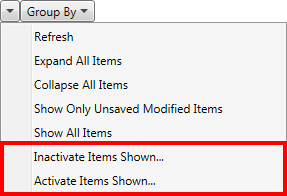
Figure 43: Options menu for selected records