Claims > Claims Items tab
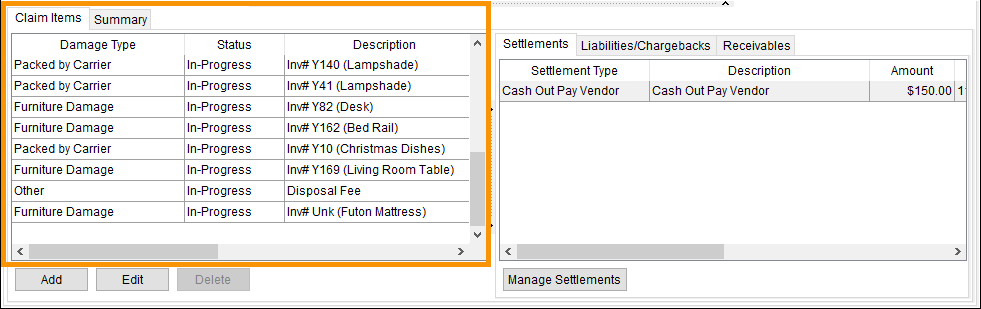
Use the Claims Items tab to list the individual claim items that comprise a claim. These line items are the costs of the claim. Users can record details such as the tagging data, initial claim amount, and manage the settlement of the claim within this section. Access this tab through Claims > Claims Items tab indicated in Figure 27.
Figure 27: Claim Items tab
Right click on a line item to open the Change Status menu (Figure 28). Use this menu to quickly update the status of a Claim Item. Another way to update a Claim Item’s status is to click a Claim Item to highlight that item and then click the Edit button. Change the Claim Item status from the Edit Claim Item screen. The options that list within the Claim Status menu are set within Claim Item Status Setup.
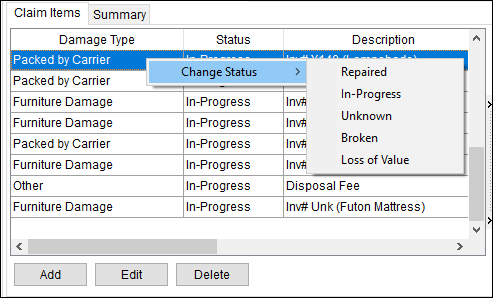
Figure 28: Change Status menu can be accessed from a claim item by right clicking on that item.
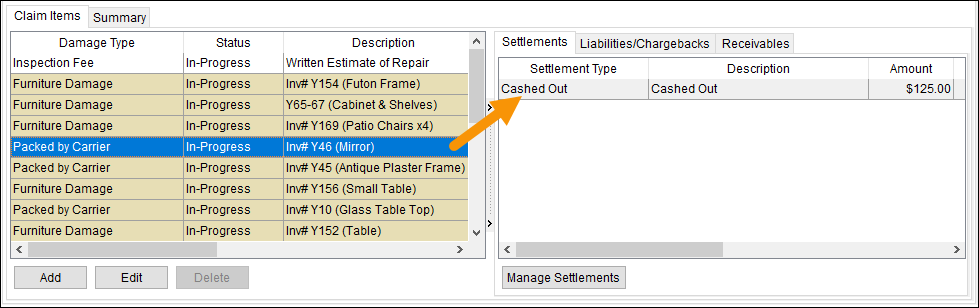
If there are items settled within the Settlement tab (in the section to the right), clicking on a Claim Item will list the Settlements for that item. If there are, the application will highlight items settled through the Settlement Entry screen. Likewise, click on the Liabilities/Chargebacks or Receivables tab to see related Claim items when the tabs are selected. Use the “Manage….” Button at the bottom of the tab to add, edit, and manage the claim item.
See Claims Process Overview for more usage information.
The following table describes the functions and tabs available within the Claim Items tab. See Add Claim Item for field descriptions.
|
Function/Tab |
Description |
|
|
Add Open the Add Claim Item screen allowing a user to define a new detailed claim item with this function. |
|
|
Edit Open the Add Claim Item screen in edit mode allowing the user to update an existing claim item with this function. |
|
|
Delete This function removes the selected claim item after prompting the user to confirm the request. |
|
Use this tab to manage the settlement of one or more claim items. | |
|
Use this tab to generate a liability and chargeback entries to a participant of the order. | |
|
Use this tab to record monies received specific to a particular claim item. | |
|
Right-Click Options |
Right-Click Options The following right-click options are available on one or more selected records: Change Status Select a value to identify the state of the item from the list defined in Claim Item Status Setup. |


