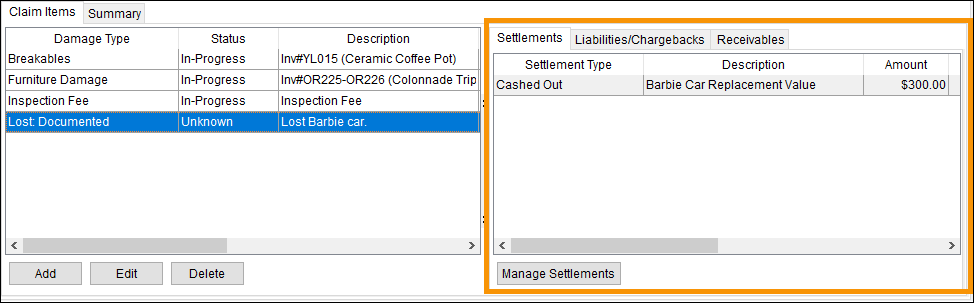
Claims > Settlement tab
“Settlements” are the expected payments to settle or resolve the claim. Use the Settlements tab to view and manage settlements of claim items.
Figure 30: Settlements tab
If a Settlement has been entered for a Claim Item, clicking on that Claim Item will prompt any Settlement on that Claim Item under the Settlement tab. Click through the Claim Items to check if there are settlements on those Claim Items.
To add a Settlement:
1. From Claims > Settlements tab, click the Manage Settlements button open the Settlement Entry screen.
2. The Settlement Entry screen is used to create and edit settlement items. See Settlement Entry for instructions on how to enter and manage settlements.
Right-click on a Settlement to prompt the Posting Information button (Figure 31).
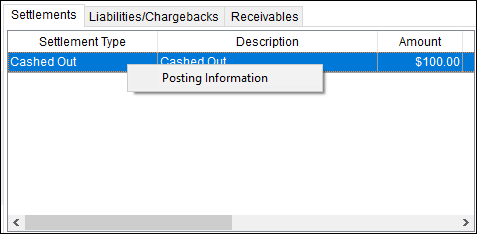
Figure 31: Right click on a Settlement to open access to the Posting Information option.
Click that button to open the Posting Information screen(Figure 32) which contains that information.
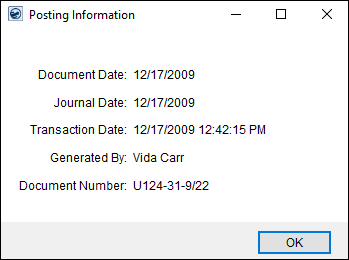
Figure 32: Posting Information screen