TIP: For information on the Liability and Chargeback screen, see Liability and Chargeback.
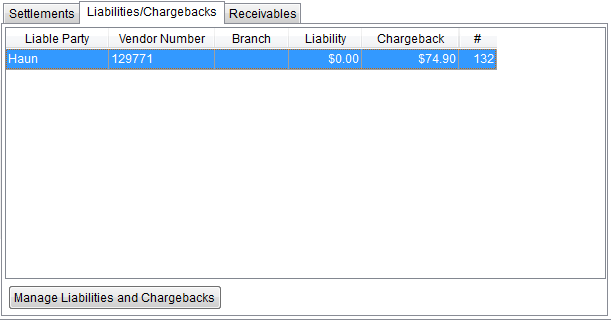
This topic refers to the Liabilities/Chargebacks tab. This tab is used to view and manage liabilities and chargebacks applied to associated parties, such as the warehouse, third party agents, vendors, and liable personnel. Liability and chargeback items represent the amount applied to a claim assessed to a driver or service providers, etc. When clicking on a Claim Item within the Claim Items tab, if there is a Liability or Chargeback, it will list within the Liabilities/Chargebacks tab.
Use the Liabilities/Chargebacks tab to create and edit liability and chargeback items and for field descriptions. See Liability and Chargeback for instructions and details on assigning Liabilities and Chargebacks against a Claim Item. Liability and Chargeback is the screen name that opens when you are on the Liabilities /Chargebacks tab and the “Manage Liabilities and Chargebacks” button is pressed.
Right-click on a line item to prompt the Posting Information button, which is clicked to see that information.
Figure 34: Liabilities/Chargebacks tab
|
|
To assign a chargeback to a driver of a foreign order, a long distance dispatcher can assign the driver to the original order and then a clerk can process the claim under the original order (posting the liability and chargeback to the driver). |
RELATED INFORMATION:
