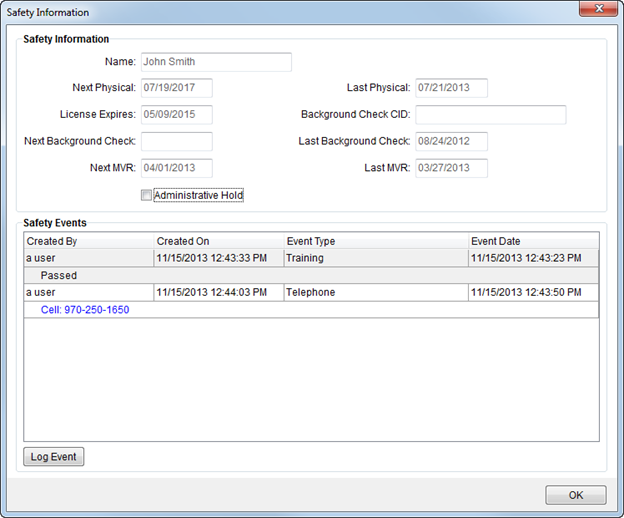
Use the Safety Information screen to view key safety data and log safety events.
Figure 5: Safety Information screen
Fields and Functions
The following table describes the fields and functions available within this screen.
Note: Different data displays depending on whether viewing safety information on a person or on an equipment resource.
|
Field/Function |
Description |
|
Safety Information (for personnel) | |
|
The following data displays when viewing safety data for personnel. All data is defined within Personnel Setup and Personnel Safety Setup. The dates evaluated for safety alerts (see Safety System for description) include the following (all visible through the Safety Information screen):
Dates evaluated for personnel: •Next Physical Date •License Expires Date •Next Background Check Date •Next MVR Date
Dates evaluated for equipment: •Next Sanitized Date •Next Inspection Date •Next Service Date •License Due Date •ICC Due Date
| |
|
Name |
The employee name displays. |
|
Next Physical |
The date this employee is scheduled to have their next physical examination. |
|
Last Physical |
Last date of a physical exam for this employee. |
|
License Expires |
The expiration date of the license for this employee displays. |
|
Background Check CID |
The Certified Identification (CID) provided by this employee that was provided for background verification. |
|
Next Background Check |
The date of the next scheduled background check for this employee displays. |
|
Last Background Check |
Last date a background checked was performed on this employee. |
|
Next MVR |
Date of the next Motor Vehicle Report (MVR) for this employee. |
|
Last MVR |
Date of the last MVR for this employee. |
|
Administrative Hold |
The Administrative Hold value set within Personnel Safety Setup displays. |
|
Safety Information (for equipment) | |
|
The following data displays when viewing safety data for equipment resources. All data is defined within Equipment Setup. | |
|
Type |
Equipment Type set for this resource display. |
|
Equipment Number |
The identifier of the resource displays. |
|
VIN |
Vehicle Identification Number (VIN) of the resource displays. |
|
Description |
Name or description of the resource. |
|
Condition |
The condition status set for the resource displays. |
|
Next Sanitized |
Scheduled date for the next time this resource is sanitized. |
|
Last Sanitized |
The date this resource was last sanitized displays. |
|
Next Inspection |
Next scheduled inspection date for this resource. |
|
Last Inspection |
Next scheduled inspection date for this resource. |
|
Next Service |
Next scheduled service date for this resource. |
|
Last Service |
The date this resource was last serviced displays. |
|
License Due |
License expiration date for this resource. |
|
ICC Due |
Date the Interstate Commerce Commission (ICC) dues are due for this resource. |
|
Administrative Hold |
This flag is checked when an administrative hold is placed on this resource. |
|
Safety Events |
|
|
This section displays the logged events for the person or resource. See Log Safety Event for field descriptions. Note: Users can double-click on an event to view the Log Safety Event screen in read-only mode. | |
|
|
Log Event Open the Log Safety Event screen allowing a user to add a new event. |
|
|
|
|
|
OK This function closes the screen. |
This screen is available through the following areas:
Local Dispatch through right-click options in Assign and Remove Crew and Assign and Remove Equipment data grids
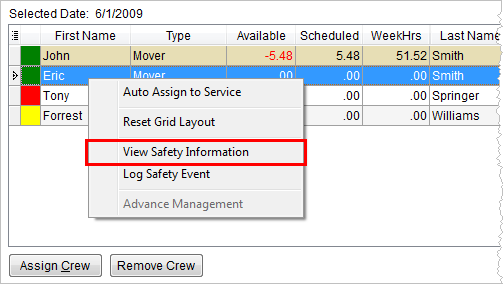
Figure 6: Assign Crew grind in Local Dispatch
Long Distance Dispatch through the safety indicator button
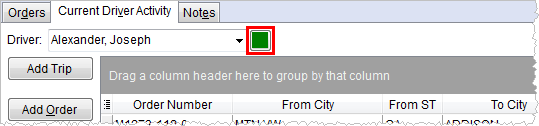
Figure 7: Current Driver Activity tab in Long Distance Dispatch

