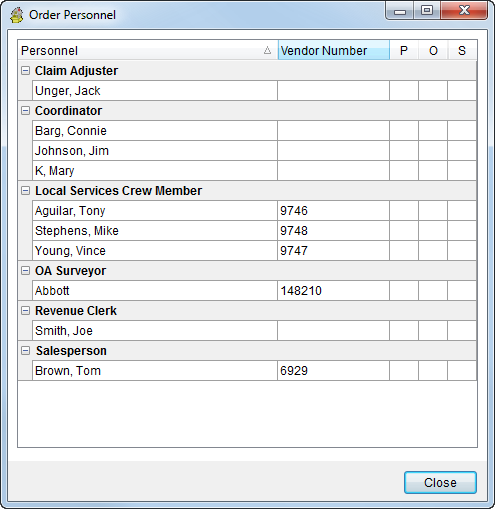
The Order Personnel dialog provides a quick list of all key personnel assigned to an order grouped by labor area. This dialog is available from within the following locations:
Order Information (Revenue Entry)
The following table describes the fields that display within Order Personnel.
|
Field |
Description |
|
Personnel |
The name of the user associated to the order as defined within Personnel Setup displays in this column. |
|
Vendor Number |
The identification number of the Vendor assigned to the employee through their Personnel Setup displays in this field. |
|
POS |
Displays the Partial, Overflow, and Set-Off values associated to a particular order segment or third party vendor. |
The following table describes the personnel groups that display within this dialog.
|
Personnel |
Description |
|
Claims Adjuster |
The name of adjuster(s) assigned to claim(s) linked to the order display in this group. The claim adjuster is set within the Claim Detail screen within Claims. |
|
Coordinator |
The name of coordinator set for the order within the Transportation Coordinator and Logistics Coordinator fields within Name, Address, Phone and the OA Coordinator set within Agents. |
|
Local Services Crew Member |
All crew assigned to local services associated to the order display in this group. See Assign and Remove Crew for more information. |
|
Long Distance Drivers |
The driver assigned to trips that include this order will display in this group. See Long Distance Dispatch for more information. |
|
OA Surveyor |
The employee set within the OA Surveyor field in Agents display in this group. |
|
Revenue Clerk |
The employee set as the Revenue Clerk of the order through Order Information (Revenue Entry) or Billing Information displays in this group. |
|
Salesperson |
The employee set as the Sales Person of the order within Name, Address, Phone displays in this group. |
|
Third Party Vendor |
This group displays all vendors associated to third party items set within Transactions. See Add Third Party Item (Revenue Entry) for more information. |