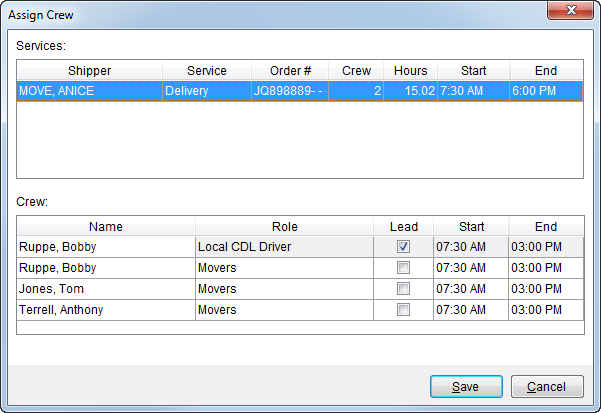
This screen is available through Dispatch Center by choosing Edit Crew from the right click options available in the services grid and through the Assign Crew option from the crew listing when multiple persons are selected.
This screen provides a way to set roles, lead, and work times for crew assigned to a service.
Figure 29: Assign Crew screen
The following table describes the fields and functions available within this screen.
|
Field |
Description |
|
Services |
|
|
Shipper |
Displays the formatted shipper name combined from the Last Name/Company Name and First Name fields from the Name, Address, Phone tab. |
|
Service |
This column displays the name of service. |
|
Order # |
Displays the MoversSuite Order Number associated to the service.
Note: “[A]” displays next to the Order Number when the order has been archived. See Order Archive for more information.
|
|
Crew |
Displays the number of crew member(s) assigned to the service. |
|
Hours |
Displays the total man hours estimated or requested to perform the service. |
|
Start |
This column displays the estimated job starting time as set through the Set Service Time screen. |
|
End |
This column displays the estimated job ending time as set through the Set Service Time screen. |
|
Crew |
|
|
This section displays the name or names of the crew assigned to the service(s) for the specified time and service. Name, role (Labor Type), and availability are defined within Personnel Setup. | |
|
Name |
The name of the person assigned to the service displays. |
|
Role |
Select the appropriate role for this employee on this service. Roles are defined in Labor Type Setup and assigned to a person through Personnel Setup. |
|
Lead |
Place a check in the Lead box for the person that is the lead role on the service. |
|
Job Start Time |
Modify the estimated starting time of the service by
entering a time in MM:SS format or by clicking one of the hour, minute, or
AM/PM values and pressing the up and down arrow ( |
|
Job End Time |
Modify the estimated ending time of the service by
entering a time in MM:SS format or by clicking one of the hour, minute, or
AM/PM values and pressing the up and down arrow ( |
|
|
|
|
|
Save (Alt+S) Saves changes made to the record and assigns the selected crew to the service(s). |
|
|
Cancel (Alt+C) Discards any changes made and closes the screen without assigning the crew. |
 ) to adjust. See
