 .
.
The
ability to interact with a report or dashboard is available by clicking the
three horizontal lines on the top right corner .
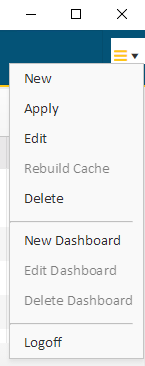
•New allows users to create a new report
•The Apply function is available for standard and drilldown reports. Clicking on Apply will save the report changes done on the fly such as
o Grouping
o Filtering
o Column Order
o Graph selection
•Users can change the settings for a current report by clicking Edit
•Rebuild Cache will allow the user to schedule the reporting data to update immediately. Users will get a message once the report is updated and ready to view (Note: this option is only available for views that have been scheduled by an Administrator)
•When clicking Delete, the current report will be deleted
•You can create a new dashboard by clicking New Dashboard
•Users can change the setting for a current dashboard by clicking Edit Dashboard
•When clicking on Delete Dashboard, the current dashboard will be deleted