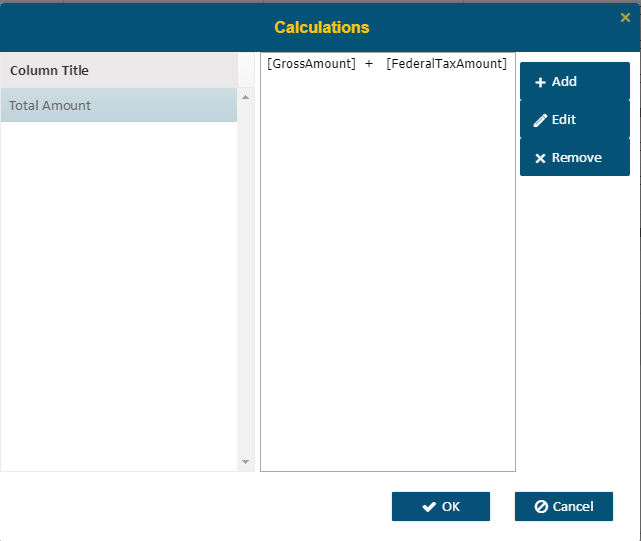
The Calculations option will allow you to create new fields that are calculations.
The left section of the screen is the list of all Calculation column names. Clicking one of them will highlight the selection and the corresponding formula will be displayed in the right section of the screen.
•Click the Add button to add a new calculation column
•The Edit Button will let users edit a selected column
•Remove will delete a selected column.
Enterprise BI does not save changes until you click OK.
Select the column and click Edit (or click Add to create a new column) then the Edit Calculated Column dialog will open.
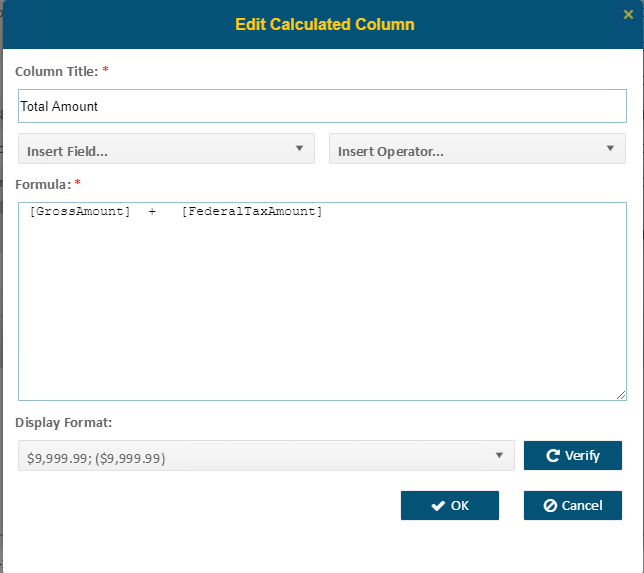
•Column Title and Formula are required
•Insert Field allows users to select fields that are available within this data source
•Insert Operator will allow for selection of useful functions.
•Users can manually type in a formula if they know the field names and functions. SQL functions and operators are allowed in a formula, which is dependent on your SQL server version.
•The Verify button checks for syntax (i.e. spelling of fields, the use of operators)
•Once created, the field will be available to select as a column for display in the original data source