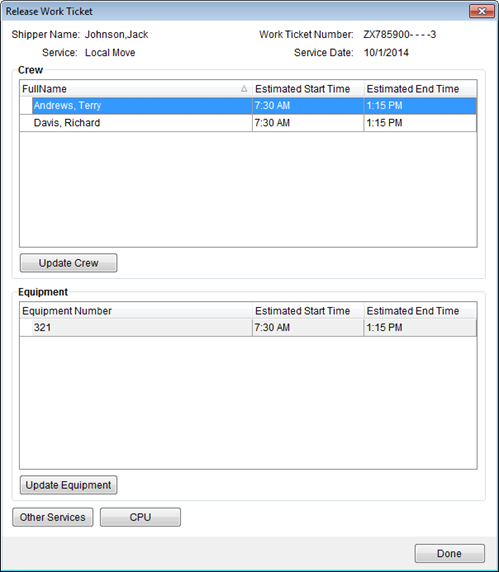
Dispatchers can use the Release Work Ticket screen to add final numbers for the labor, services, and materials involved in the service. These updates assist in providing accurate revenue from the request and for accurate reporting. Access to the Release Work Ticket screen is through the Enter Actuals button from Dispatch Center and the Enter Service Actuals through Order Information (Revenue Entry).
Figure 19: Release Work Ticket screen
Described below are the functions within the Release Work Ticket.
|
Function |
Description |
|
|
Update Crew Accesses the Update Crew screen allowing a user to record actual start and end times for crew member(s). See Update Crew and Equipment for more information. |
|
|
Update Equipment Accesses the Update Equipment screen allowing a user to record actual start and end times for equipment resources. See Update Crew and Equipment for more information. |
|
|
Other Services Opens the Other Services screen where revenue items associated to the local service can be added, edited, or deleted. |
|
|
CPU This function opens the Update Containers, Packing and Unpacking screen allowing a user to enter actual counts for material items and to manage crating data. Related to this function is the ability to enter estimated counts for services through the CPU option available through the right-click menu on the main Dispatch Center work grid. |
|
|
Done This function closes the screen. |