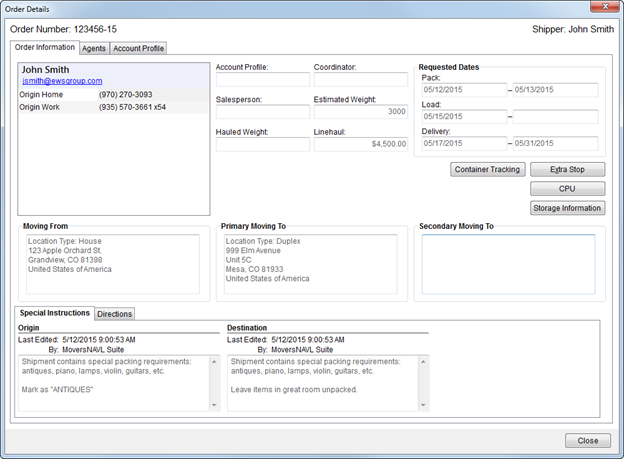
The Order Details screen provides a user with quick access to key data for an order. This read-only screen is available in the following locations:
The Order Details screen is modeless and remains open while you work in MoversSuite.
The layout of the Order Details screen is consistent throughout the application.
Figure 124: Order Details screen
The following table describes the fields and functions available within the Order Details screen.
|
Field/Function |
Description |
|
Order Number |
This field displays the identification number assigned to the order.
Note: When an order has been archived, it is no longer available for certain functionality and is identified by a “A” icon next to it. Refer to Order Archive for more information.
If the order has been archived, the Archived On date field appears on this screen (see description below). |
|
Shipper Name |
Displays the name entered for the shipper within the First Name/MI and Last Name/Company Name field within Name, Address, Phone. |
|
Order Information tab |
|
|
Shipper Contact |
|
|
Refer to the Shipper Contact Information section in Name, Address, Phone for more information. | |
|
Shipper Name |
Displays the name entered for the shipper within the First Name/MI and Last Name/Company Name field within Name, Address, Phone. |
|
|
The email address set for the shipper within Name, Address, Phone displays. Users can click on the email address and the application will evoke the system default mail utility (such as Microsoft Outlook) placing the email address for the shipper as the message recipient. |
|
Phone Numbers |
The phone numbers set for the shipper within Name, Address, Phone display. |
|
|
|
|
Account Profile |
The profile assigned to the order appears in this field. Additional data is available through the Account Profile tab on this screen and through the main Account Profile tab. |
|
Coordinator |
Displays the user assigned to the order through the Transportation Coordinator field within Name, Address, Phone. |
|
Salesperson |
Displays the user assigned to the order through the Salesperson field within Name, Address, Phone. |
|
Estimated Weight |
Displays the Estimated Weight of the move set within Move Information. |
|
Hauled Weight |
Displays the Hauled Weight of the move set within Move Information. |
|
Linehaul |
Displays the amount of Discounted Linehaul set within Move Information. |
|
Archived On |
When an order has been archived, the date and time it was archived displays on this screen. Refer to Order Archive for more information. |
|
Requested Dates |
This section displays the Range dates and times set for packing, loading, and delivery within Move Information. |
|
|
View container data for the order. Pressing this button opens the Container Management screen. |
|
|
Extra Stop (Alt+X) This function opens the Extra Stops screen allowing the user to view extra stop and segment information. |
|
|
CPU This button opens the Update Containers, Packing and Unpacking screen allowing you to view material estimates and crating information associated to an order. |
|
|
Storage Information This function opens the Storage Information screen allowing the user to view SIT and recurring billing data set for the order. See SIT/Recurring Billing for more information. |
|
Moving From |
The formatted origin address set within the Moving From section in Name, Address, Phone displays here.
Note: If the Location Type is set for the address, then it displays in this section following a label of “Location Type.”
|
|
Primary Moving To |
The formatted origin address set within the Moving To - Primary section in Name, Address, Phone displays here.
Note: If the Location Type is set for the address, then it displays in this section following a label of “Location Type.”
|
|
Secondary Moving To |
The formatted origin address set within the Moving To - Secondary section in Name, Address, Phone displays here.
Note: If the Location Type is set for the address, then it displays in this section following a label of “Location Type.”
|
|
Special Instructions |
This section displays Origin and Destination information set within the Special Instructions section in Move Information. |
|
Directions |
This section displays Origin and Destination information set within the Directions section in Move Information. |
|
Agents tab |
|
|
View agent data for this order. This tab is a read-only version of the Agents tab. | |
|
Account Profile tab |
|
|
View account settings including contacts and recommended services for the order through this tab. This tab is a read-only version of the Account Profile tab. | |
|
|
Close Close the screen by pressing this button. |