Administrators can establish two Office and Industrial Move Type definitions: One for the main order and a second one for any sub-orders that will be created under the main order. The sub-order Move Type will be defined to allow manual Order Number entry that will prompt the user to input the Order Number once booked. This is to allow the user to reference the same Order Number defined for the main O&I Move order for the sub-orders, as well. The difference between each order will be the assignment of a unique value to the Segment (Partial, Overflow, or Set-Off) field; set when the order is booked.
Defining Move Types for an Office & Industrial move
1. In MoversSuite Administration (web),
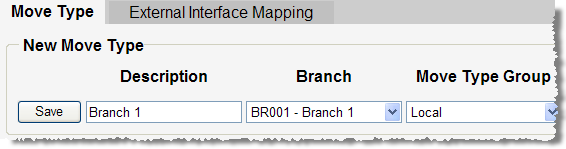
2. Open the Move Setup > Move Type setup (see Move Type Setup) and the Move Type tab will appear,
Figure 49: Move Type setup screen.
In the New Move Type section:
3. Enter a Description of “O&I Main” for the primary O&I Move order,
4. Select a Branch from the available list,
5. Select a Move Type Group from the available list, such as “N/A Local”,
6. Click on the box under Is Long Distance if this Move Type is to be available in Long Distance Dispatch (optional). Note: Since O&I Moves are normally under Own Authority, then this option is typically not selected,
7. Select an Order Number Style from the available list (optional). This can be set for the main O&I Move order but must not be set for the sub-order Move Type. Leaving the Order Number Style field blank will force the application to prompt the user for an Order Number when booking the sub-orders,
8. Press Save to add the record,
9. Repeat Steps 4 through 9 entering “O&I Sub” for the Description and leaving the Order Number Style field blank,
10. Repeat Steps 4 through 10 for each Branch of service that will process O&I Move orders.
Once completed, there will be two Move Types established on the system, one for the primary move entitled “O&I Move” and one for all the sub-orders underneath it entitled “O&I Sub.”
RELATED TOPICS: