Field
Description
Move Type Tab
Description
Enter the name of the Move Type record (up to 25 characters). These records will be available as options to the Type of Move field in Move Information.
Make orders of this type available in Long Distance Dispatch
Set this flag to make orders belonging to this move type record available for assignment to drivers through Long Distance Dispatch.
Note:
This flag has no effect on Local Dispatch or Local Services.
Branch
Select a Branch from the list of those defined within the Branch Setup. This branch will be the default for any order created using this move type record.
Move Type Group
Select a Move Type Group from the drop-down list to associate a general ledger account to this particular move type record.
Use Move Type Group Setup to create groups.
Note: A generic type of “Not Mapped” has been provided by MoversSuite.
Order Number Style
Select a style to apply to an order when the move type is assigned. Refer to the Order Number Setup for specifics.
Selecting –none- will turn on the Manual Order Number flag that will require the user to enter a free-form Order Number when booking orders.
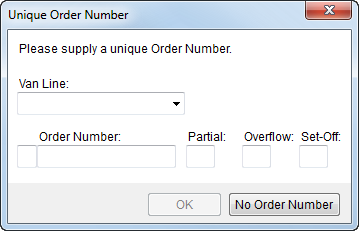
Figure 54: Unique Order Number dialog
See Unique Order Number and Book Order Information for more details.
Interface Item
Use this section to link the make record to an external system that may be required for exchanging data between disparate systems.
Interface
Select a value from the list defined within XML Interface Setup.
External Code
Enter a code supported by the Interface for exchanging data with MoversSuite (up to 32 characters).