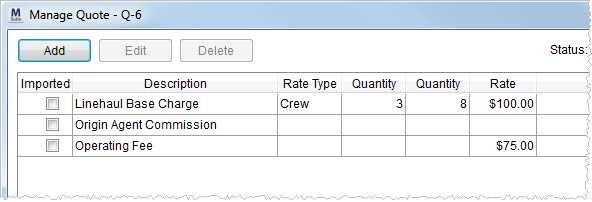
The Manage Quote screen allows a user to add, edit, delete, and group, and arrange quote detail items as well as set the status of a quote. Quote items created within this screen will be visible within the Quote Details data grid on the Quote tab.
Figure 4: Manage Quote screen
Quotes set with a Status of “Accepted” will be available within Revenue Import. Items that have been imported into Revenue Entry will contain a checkmark in the Imported column.
The following table describes the functions available within this screen.
Important:
The user must press Save to keep all changes, including changes using the Add, Edit, Group, and Un-Group functions.
|
Function |
Description |
|
|
Add This function opens the Add Quote screen. |
|
|
Edit This function opens the Add Quote screen in edit mode. |
|
|
Delete This function removes the selected quote item record without prompting the user to confirm the request. |
|
Status |
Status Select a status value from the list of those defined within Quote Status Setup. Status must be set to Accepted for the quote to be available within Revenue Import. |
|
The following six fields control the appearance of the line items on quote output, such as what displays on the Quote Form. | |
|
|
Move Top Move the selected record to the top of the listing. |
|
|
Move Up Move the selected record up one place in the listing. |
|
|
Move Down Move the selected record up one place in the listing |
|
|
Move Bottom Move the selected record to the bottom of the listing. |
|
|
Group Open the Create Quote Group screen after selecting one or more records. Users can opt to include all selected quote items into a single line item description. Note: To select multiple records at a time hold down the CTRL key and click on records individually or select a range of records by holding down the SHIFT key and clicking on a starting and ending record value. |
|
|
Un-Group Remove the selected group without prompting. Users cannot edit a group; they must Un-Group and then recreate the group using the correct attributes. |
|
|
Save Saves all changes made and closes the screen. |
|
|
Cancel Reverts all changes made and closes the screen including those to add a quote item and group functions. Important: Cancel will discard all changes made including new items and groups made during the current screen session. |
|
Total Quoted |
The total dollar amount of all quote item charges displays in this field. |
See Add Quote for field listing.


