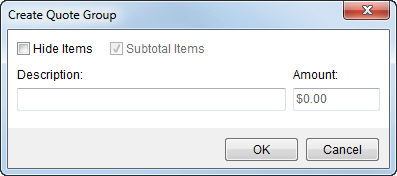
The Create Quote Group screen allows a user to combine items to list as one record on an invoice or quote. This screen is available through the Group function in Manage Quote.
Figure 6: Create Quote Group screen
Grouped items will display on output such as the Quote Form and are available within Invoice Management. Items associated to revenue will list separately in Revenue Entry (based on the logical grouping of the item).
The following fields and functions are available within Create Quote Group screen.
|
Field/Functions |
Description |
|
Hide Items |
Choosing Hide Items will suppress details of associated quote items from appearing on formatted output; only a summary line containing the group description will display. Hidden items will appear grayed-out in the Manage Quote display. Setting this field will activate the Subtotal Items option. |
|
Subtotal Items |
Select Subtotal Items to base the group amount on the amount of all included items. Users will be able to modify the Amount otherwise. |
|
Description |
Enter a title that represents this group if quote items (up to 128 characters). |
|
Amount |
This field will display the total amount of all quote items belonging to the group. User will be able to update this field if Subtotal Items is not checked. |
|
|
OK Saves the group and closes the dialog. Newly added records will automatically appear within the Manage Quote screen. |
|
|
Cancel This function closes the dialog without saving the record. |
Users cannot edit groups. To change the attributes of a group, a user will need to Un-Group it and recreate the group with correct attributes.

