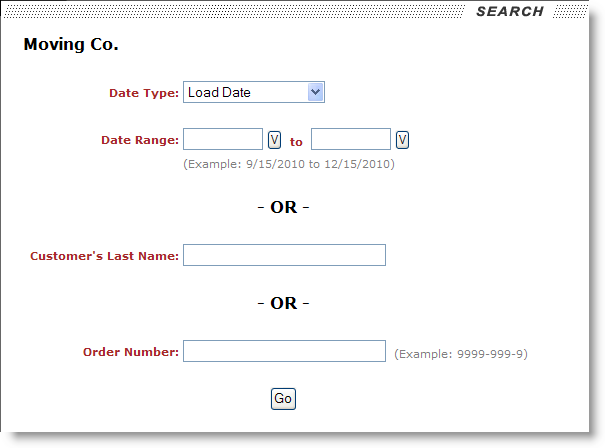
Account representatives assigned a to view household goods moves will be able to search for orders based on a move date, last name, or Order Number.
Figure 14: Household goods move search page
Search options available for a User Type of Household Goods are described in the table below.
|
Field |
Description |
|
Date Type |
Select a type of date to base the date range search on. The Date Type can be one of the following: Load Date This option will return all records for the selected date range based on the start and ending Load Dates set in Move Information that are not in “Cancelled” or “Voided” state.
Delivery Date This option will return all records for the selected date range based on the start and ending Delivery Dates set in Move Information that are not in “Cancelled” or “Voided” state.
Order Initiated Date This option will return all records for the selected date range based on the Created On date (in Move Information) of orders that are not in “Cancelled” or “Voided” state.
|
|
Date Range |
Enter a range of dates to be used to retrieve records on
based on the selected Date Type. Users can press the calendar
button (
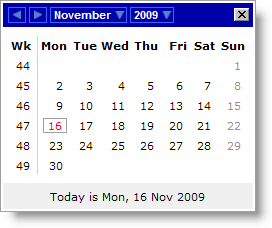
Figure 15: Calendar selector Once a date is selected in the calendar, the application will place the date formatted a MM/DD/CCYY in the corresponding range value. |
|
Customer’s Last Name |
Enter a value to retrieve orders by based on the Last Name/Company Name field in Name, Address, Phone. |
|
Order Number |
Enter a value to retrieve orders based on the Order Number. |
The results of the search display in the Query Results page.
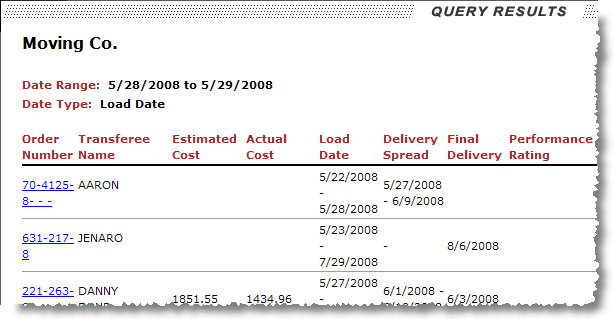
Figure 16: Household goods search results
Users can click on the Order Number link to access the Move Information page of a particular order. This page displays basic move data and dates and provides contact information, etc. Note: The Email field displays as a hyperlink, when present, that can be used to evoke a new email message, see Fig. 16 (below).
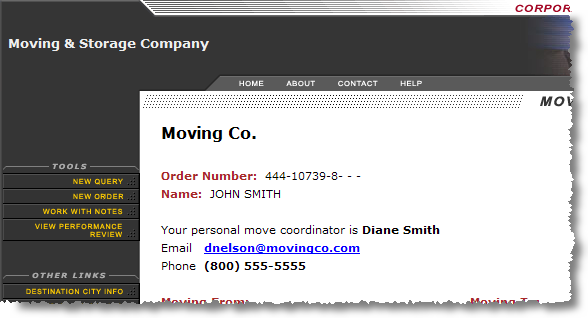
Figure 17: Transferee Tools menu
Tools available to the account representatives are described in the table below.
|
Account Representative Tools |
Description |
|
New Query |
This function opens the Search page. |
|
New Order |
Open the New Order page that used to register a lead in MoversSuite. |
|
Work with Notes |
Opens the Notes page allowing users to add and view notes created only within the Customer Web Portal for the order. Refer to Customer Web Portal Notes for more information. |
|
View/Online Performance Review |
Account representatives can view questionnaire filled out by transferees. Refer to Online Performance Review for more information. |
Refer to the Household Goods Data section for field descriptions.
 ) to access a calendar
where a date can be selected.
) to access a calendar
where a date can be selected.