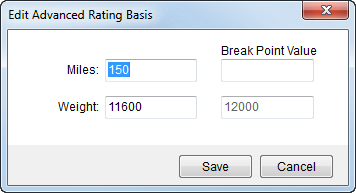
The Edit Advanced Rating Basis screen allows a user to view and modify order basis values that factor into an Advanced Rating scheme.
Figure 7: Edit Advanced Rating Basis screen
This screen is available through the ellipses button ( ) attached to the Rate field when an
Advanced Rating scheme is in effect. It will appear in the following
screens:
) attached to the Rate field when an
Advanced Rating scheme is in effect. It will appear in the following
screens:
The Edit Advanced Rating Basis screen displays the two basis values along with corresponding breakpoint values. The application sets the basis values from data of the order, as outlined in Rate Matrix Setup. Users can update the values and the application will recalculate the rate of the order based on the modified values when Save is pressed.
Note:
The changes made in this screen only affect the rate of the particular item and will not update values set for the order.