MoversSuite Administration > Accounting and Financial Services > Rate Matrix
Define Rate Matrix records assignable to Rate Plan Setup records based the following data elements from an order. The following options will appear when assigning X Range and Y Range coordinates.
|
Element |
Description |
|
Cubic Feet |
Set a range based on the Cubic Feet of the order set within Move Information. |
|
Linear Feet |
Set a range based on the Linear Feet of the order set within Move Information. |
|
Miles |
Set a range based on the Miles of the order set within Move Information and within Billing Information (Revenue Entry). |
|
Weight |
Set a range based on the Weight of the order set within Move Information and within Billing Information (Revenue Entry) |
A rate matrix sets a rate based on the intersection of the X Range and Y Range values. For each X Range and Y Range, a set of values will be defined along with a rate. When the data from the order matches the range, the system returns the rate. Additionally, breakpoints can be set to instruct the system to return the rate from the next range.
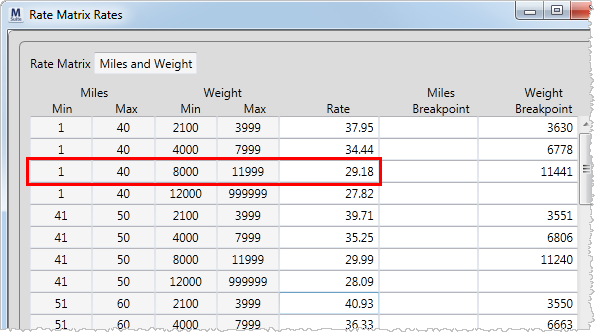
The following Rate Matrix is provided by MoversSuite and contains a Y Range for Miles and X Range for Weight. Under this scheme, if the move is 35 miles for a weight of 10,000 pounds, then a rate of 29.18 is returned.
Figure 8: Rate Matrix Rates screen
View this and other defined matrices through the Rate Matrix Report.
The following table describes the fields and functions within this setup.
|
Field/Function |
Description |
|
Description |
Enter a name to identify the matrix (up to 32 characters). |
|
X Range |
Select a value to represent the row side of the matrix from the list of order elements described above (Cubic Feet, Linear Feet, Miles, Weight). |
|
Y Range |
Select a value to represent the column side of the matrix from the list of order elements described above (Cubic Feet, Linear Feet, Miles, Weight). |
|
|
Opens the View Rate Matrix Range X Details screen where a user can view and set the ranges comprising of Minimum and Maximum values for each range. See the Rate Matrix Rates screen to view and set the rate and breakpoint parameters. |
|
|
Opens the View Rate Matrix Range Y Details screen where a user can view and set the ranges comprising of Minimum and Maximum values for each range. See the Rate Matrix Rates screen to view and set the rate and breakpoint parameters. |
|
|
Opens the Rate Matrix Rates screen where a user can set rates and breakpoints for each X Range and Y Range intersection. |
RELATED TOPICS:


