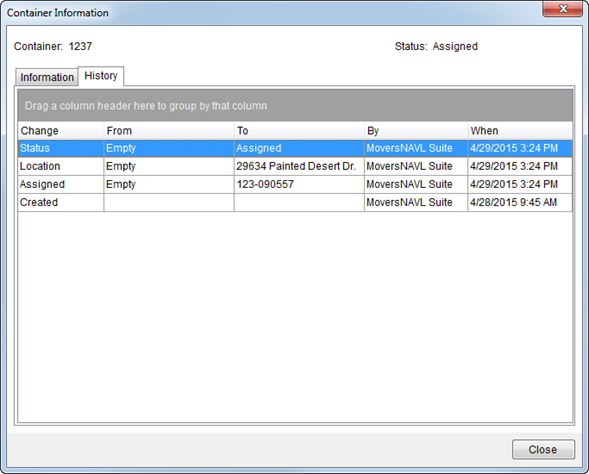
The Container Information screen, available through a right-click option in Container Management, allows you to view container information and history of changes and assignments made to the container.
Figure 4: Container Information screen
This screen consists of two tabs described along with other data in the following table.
|
Note |
|
These fields are set by default for the container within Container Setup and several can be updated/set through Container Management. |
|
Field/Function |
Description |
|
Container |
Identifier of the container displays in the header. |
|
Status |
Current status of the container displays. |
|
Information tab |
|
|
This tab displays the current values assigned to the container. | |
|
Container |
This column displays the record identifier set for the container. |
|
Container Type |
The Location Type set for the container displays. |
|
Length |
The dimensions of the container display in these fields (measured in feet). |
|
Width | |
|
Height | |
|
Tare Weight |
This is the empty/unladen weight of the container (in pounds). |
|
Status |
The current status assigned to the container. |
|
Active |
Displays “True” if the container is active and available for assignment. Displays “False” if the container is not available. |
|
Ownership |
The owner type set for the container displays. |
|
Branch |
Displayed in the column is the branch assigned to the container. |
|
Currently Assigned to |
The Order Number currently assigned to the container. |
|
Current Location |
Current physical address of the container. |
|
History tab |
|
|
This tab lists the changes made to the container with the most recent displaying at the top of the list. | |
|
Right-Click Options The following right-click option is available within the data grid of this tab.
Export To Send the data grid contents to a spreadsheet or browser window. Choose “Excel” to open a new workbook within Microsoft Excel containing the data or “HTML” to open to view the contents through an Internet browser window. Refer to Export To for more information on exporting data from a data grid.
| |
|
Change |
The container property that changed displays. The current property assignments for the container display within the Information tab. |
|
From |
Displayed in these two columns are the values for the changed property prior to the change (From) and after the change (To). If a field was not originally set, then its initial From values is “Not set.” |
|
To | |
|
By |
The MoversSuite user that performed the changed displays. |
|
When |
Date and time that the change occurred displays in this column. |
|
|
Close Press this button to close the screen. |
