The most prevalent report-generation tool is the Report Viewer. This application is included with the Microsoft SQL Server Reporting Services suite and generates output for Reporting Services Reports and Crystal Reports documents. The Report Viewer is a stand-alone window that appears when the report generates.
|
Note |
|
Some Crystal Reports documents will not work with Reporting Services and may need to generate through a Crystal Reports server. |
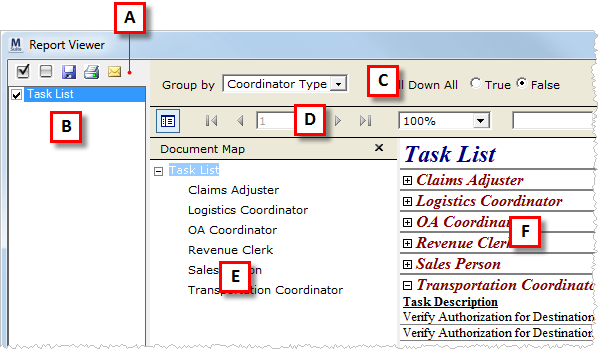
Figure 7: Report Viewer attributes
The Report Viewer contains the following attributes.
|
Key |
Description |
|
A |
Report File Options Users have options to select one or more reports and save, print, and email the selected records. See the Report File Options for detailed information. |
|
B |
Report File Selector The Report Viewer will list one or more report files in this pane. Users can select all those they wish to view or perform a save, print, or email function on. Multiple files display through functions such as Commission Statement Management and Customer Statements. |
|
C |
Run-time Parameters The input parameters needed by the open report display in this section. Refer to the specific report details within Standard Report and Document Listing for parameter descriptions. Note: Updates to the section require the user to press View Report to regenerate the report. |
|
D |
Report View Options This section will contains basic functions for working with the report data. See the Report View Options for detailed information. |
|
E |
Document Map This section allows a user to navigate through the major report groupings, if provided. This option provides a convenient way for a user to locate specific data within a large report, such as the Dispatching Services Report. Use expand ( |
|
F |
Report Display This section displays the report. Refer to the specific report details within Standard Report and Document Listing for report detail descriptions. |
 ) and
collapse (
) and
collapse ( ) buttons to navigate
within this pane.
) buttons to navigate
within this pane.