MoversSuite > Revenue Entry > SIT/Recurring Billing tab > Recurring Billing section > Payment Setup tab
MoversSuite > Order Information > SIT/Recurring Billing tab > Recurring Billing section > Payment Setup tab
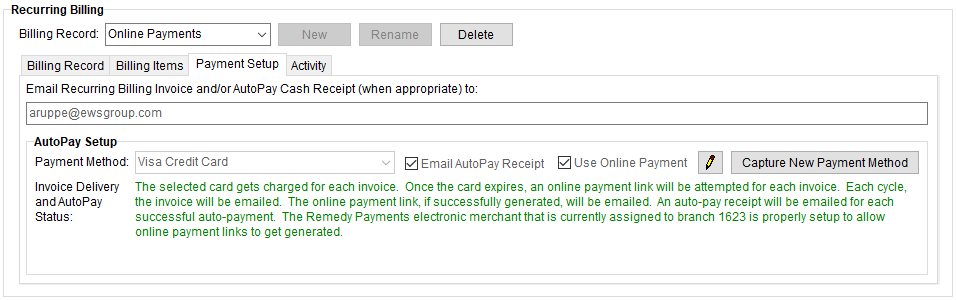
The Payment Setup tab allows you to establish payment information for billing items on an order as part of Recurring Payments. Use this tab to setup Automatic Payments, send Online Payment links to customers, and other payment options. If an email address is required and not entered, the system will show an error. Also, notice the “Invoice Delivery and AutoPay Status” section which details what will happen with the options that are set. Changing an option, such as checking or unchecking the Use Online Payment box, will change the message. Use Capture New Payment Method
Figure 9: Payment Setup tab
When the Use Online Payment checkbox is checked, any of the following System Emails can be sent, depending upon the following situations:
•When an unexpired card (or bank account but note that bank accounts do not expire) is specified and the electronic merchant set to process that card or account is now inactive or no longer allows new sales, then the “Deactivated Electronic Merchant” system email is sent.
•When the credit card has expired, then the “Expired Online Payment” system email is sent.
•If none of the above, then the “Online Payment Link” system email is sent.
The header above the box where email addresses are entered will change depending upon options set within the Payment Setup tab, such as whether the process is set as an Online Payment or if a Payment Method is set for Automatic Payments, and the Billing Record tab, such as checking “Email Invoice.” In Figure 9, the header reads “Email Recurring Billing Invoice and/or AutoPay Cash Receipt (when appropriate) to.”
Refer to the Electronic and Online Payments topic for complete setup information.
Email Option
Link the billing record to one or more email addresses (separate each email address with a comma or semicolon) within the Email Recurring Billing Invoice to field. Setting the email address enables the email functionality related to Recurring Billing Emails and Recurring Payments.

AutoPay Setup
See AutoPay Setup (Recurring Billing) for details on this section of Payment Setup. See Automatic Payments for detailed instructions for setting up that process.