MoversSuite Administration > Claims > Claim Type to Claim Damage Type Map
This setup area maps a Claim Type to a Claim Damage Type.
Establish the options available within Damage Type dropdown in the Add Claim Item screen within this setup. Specifically, use this setup to associate the Damage Type dropdown options with a particular Claim Type. When mapped, only the Damage Type options associated to a Claim Type through this setup will be available in the Damage Type field in Claim Detail.
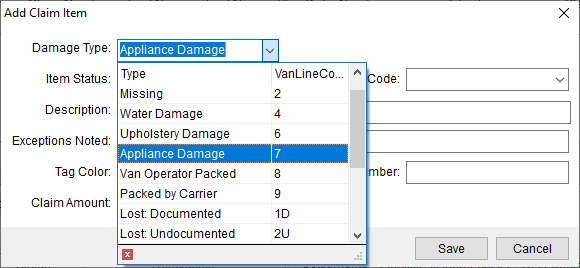
In the image below, the dropdown menu within Damage Type lists the options that are mapped to the Claim Type set on the claim.
Figure 70: Add Claim Type > Damage Type dropdown menu
Looking at the Add Claim Item > Damage Type option set above, the Damage Type set is “Appliance Damage.” Within the Claim Detail, the Claim Type was set as “HHG” (according to our setup). It is easy to see this Claim Type within the Claim grid as shown within Figure 70.
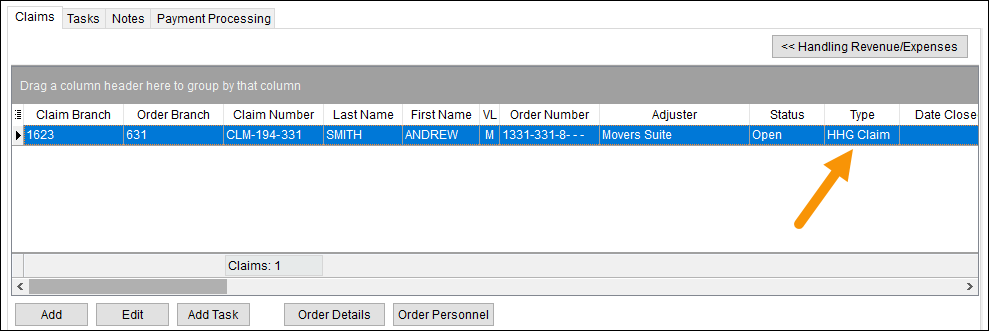
Figure 71: Claim Type shown on this claim within the Claims Grid.
For this example, Claim Type to Claim Damage Type Map Setup record for that “Appliance Damage” option is the one shown in Figure 72. This record shows that for the Claim Type “HHG Claim,” the option Appliance Damage will show within the Add Claim Item > Damage Type dropdown.

Figure 72: Claim Type to Claim Damage Type Map Setup record for this example.
To map another Claim Type to Claim Damage Type Map, create a record as follows:
1. Review the Claim Damage Type Setup to make sure the Damage Type record exists. If not, create one using instructions within Claim Damage Type Setup.
2. At the top of the Claim Type to Claim Damage Type Map Setup screen, use Click here to add new Claim Type to Claim Damage Type Map.
3. Choose the Claim Type.
4. Choose the Claim Damage Type.
5. Click Add to save.

The following technical table describes the details for each field.
|
Field |
Description |
|
Claim Type |
Select the base type from the list defined in Claim Type Setup. |
|
Claim Damage Type |
Associate the record with a format defined within Claim Damage Type Setup. Only the values associated with a particular Claim Type will display as options in the Damage Type field in Claim Detail. |
RELATED INFORMATION: