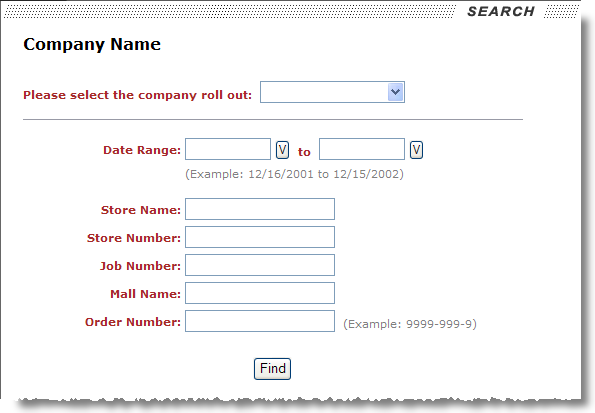
Account representatives assigned a to view special commodities moves will be able to search for orders based on a company roll out, a particular date range, store name, store number, job number, mall name, and/or Order Number.
Figure 23: Special Commodities search page
Search options available for a User Type of Special Commodities are described in the table below. These search options can be used individually, such as just selecting a product group and pressing Find, or they can be used in conjunction to produce a narrow result set.
|
Field |
Description |
|
Company Roll Out |
Select a product group from the available list. Product groups are associated to the order through the Task Group field in Name, Address, Phone. Task Group is a subset of a Task Definition assigned to the account representative through their Profile setting (see Customer Web Portal Setup and Administration). Note: This option is required and a roll out must be selected before pressing Find. |
|
Date Range |
Enter a particular date range to base record selection on. The application compares entered dates to Delivery Dates within Move Information. |
|
Store Name |
Enter the name of a particular store to select on. The application compares entered dates to the Store Name field in Store Information (see Add Job). |
|
Store Number |
Enter the number of a particular store to select on. The application compares entered dates to the Store Number field in Store Information (see Add Job). |
|
Job Number |
Enter the name of a particular job to select on. The application compares entered dates to the Job Number field in Store Information (see Add Job). |
|
Mall Name |
Enter the name of a particular store location to select on. The application compares entered dates to the Location field in Store Information. |
|
Order Number |
Enter a value to retrieve orders based on the Order Number. |
The search results will display in the Job / Location Information page.
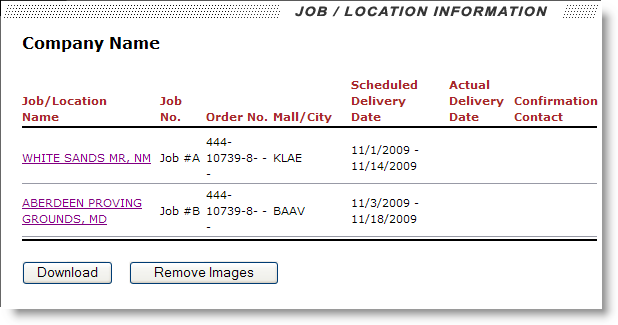
Figure 24: Job / Location Information page
Clicking on the Job/Location Name link will access the product information for the particular special commodities move.
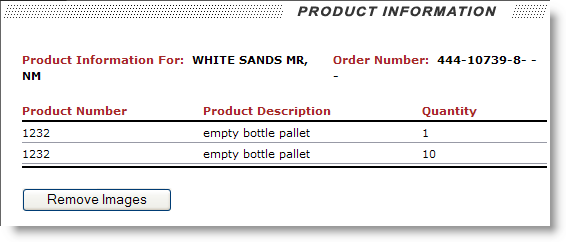
Figure 25: Product Information page
Refer to the Special Commodities Data section for field descriptions.