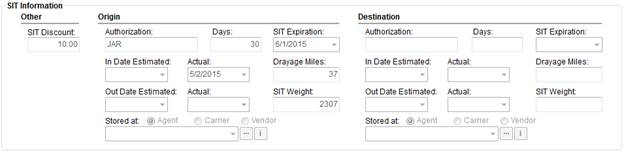
The SIT Information section of the SIT/Recurring Billing tab allows a user to document key data of storage-in-transit (SIT) shipment, including authorization, estimated actual dates, along with storage location, etc. at the origin and destination of a move request.
Figure 2: SIT Information section
This information may be required for uploading and downloading to a third party application and displays on several military forms, as well.
The following table lists the fields available within the SIT Information section for either Origin or Destination locations.
|
Note |
|
The application determines what SIT Information data is uploaded to a third party application on what is set for the Storage Requirement field within Move Information. |
|
Field |
Field Description |
|
Other |
|
|
SIT Discount |
This field provides the discount applicable to SIT for this order. The discount is generally from an external interface, including the following:
|
|
Origin/Destination |
|
|
The following fields apply to both Origin and Destination SIT | |
|
Authorization |
Enter the name of the person that authorized the temporary storage request (up to 128 characters). |
|
Days |
Enter the number of days that the goods will be in storage at the origin and/or destination location. This value entered for Days is added to the In Date Actual date to automatically compute the SIT Expiration. |
|
SIT Expiration |
Enter the expiration date of the temporary storage. This is the point at which the shipment is considered in permanent storage. The application computes this date automatically as the number of Days set added to what is set for the In Date Actual. See Date Fields for data entry options. This date field value is available as a Task Dependency Dates. Refer to SIT Orig Perm Date and SIT Dest Perm Date. The SIT Expiration date at the destination affects Shipment Status as a Key Date assignment to Set Shipment Status record (denoted as the Destination SIT Out date) |
|
In Date Estimated/Actual |
Enter the Estimated date that the shipment is to arrive and the Actual arrival date of the shipment. See Date Fields for data entry options. This date field value is available as a Task Dependency Dates. Refer to the following: SIT Dest Act In Date SIT Orig Act In Date SIT Dest Est In Date SIT Orig Est In Date
These dates can be updated through Set Shipment Status and from automated updates from an external interface as well. |
|
Drayage Miles |
Enter the transportation mileage required to take the goods from the origin address to the Origin Agent warehouse (Origin) or from the Destination Agent warehouse to the destination location (Destination). The value in this field affects Military EDI Invoice Integration. |
|
Out Date Estimated/Actual |
Enter the Estimated date that the shipment is to depart and the Actual departure date of the shipment. See Date Fields for data entry options. This date field value is available as a Task Dependency Dates. Refer to the following: SIT Dest Act Out Date SIT Orig Act Out Date SIT Dest Est Out Date SIT Orig Est Out Date
These dates can be updated through Set Shipment Status and from automated updates from an external interface as well. |
|
SIT Weight |
This field provides the weight associated to SIT for this order. This weight is generally from an external interface, such as EasyDPS Integration. |
|
Stored at |
Select Agent, Carrier, or Vendor who is providing the storage and then select appropriate agent, carrier, or vendor within the following field or use the Agent Find, Carrier Information, or Vendor Find to locate the correct party. |
RELATED TOPICS:
Form 619 and Form 619-1 Contents
SIRVA Registration Upload Content