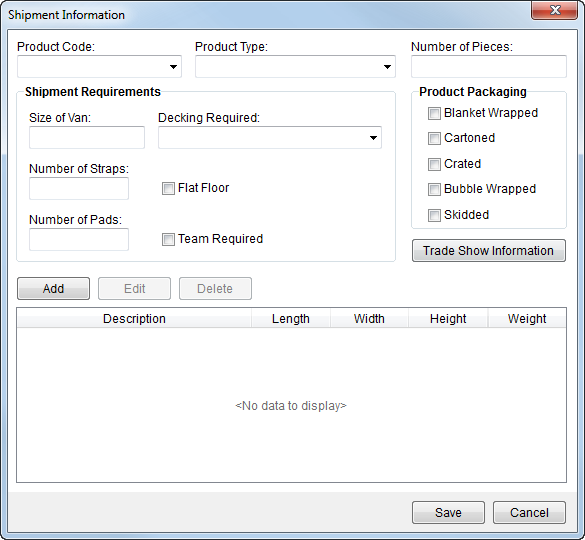
Shipment and trade show data is stored within the Shipment Information screen. Users can note specific shipment needs including piece count, decking requirements, blankets, etc. Additionally, users can establish trade show data and specifics of each item including its dimensions and weight.
Access to the Shipment Information screen is through the Shipment Details button in Move Information.
Figure 32: Shipment Information
Described in the table below are the fields and functions available within Shipment Information tab.
|
Field/Function |
Description | ||||||||||
|
Product Code |
Associates the shipment to a code that will link the record to an external application, specifically to SIRVA.
See Product Code Setup for more information.
| ||||||||||
|
Product Type |
Associates the shipment to a produce code that will link the record to an external application, specifically to SIRVA.
See Product Type Setup for more information.
| ||||||||||
|
Number of Pieces |
Enter the piece count of the shipment. Dimensions and weight of each item belonging to the shipment can be documented through Add Shipment Information (listed in the grid at the bottom of this screen).
| ||||||||||
|
Shipment Requirements |
| ||||||||||
|
Size of Van |
Size of the van needed for the shipment (in feet).
| ||||||||||
|
Decking Required |
Indicates the type of decking needed for the vehicle as either FULL or HALF.
| ||||||||||
|
Number of Straps |
Count of the straps needed for the shipment.
| ||||||||||
|
Flat Floor |
Set this flag to indicate flat floor is required or requested for the shipment.
| ||||||||||
|
Number of Pads |
Count of the pads needed for the shipment.
| ||||||||||
|
Team Required |
Set this flag to indicate that a team is required or requested for the shipment.
| ||||||||||
|
Product Packaging |
| ||||||||||
|
Blanket Wrapped |
Set this flag to indicate blankets are required or requested for the shipment.
| ||||||||||
|
Cartoned |
Set this flag to indicate cartons are required or requested for the shipment.
|
|
Crated |
Set this flag to indicate crates are required or requested for the shipment.
| ||||||
|
Bubble Wrapped |
Set this flag to indicate bubble wrap is required or requested for the shipment.
| ||||||
|
Skidded |
Set this flag to indicate skids are required or requested for the shipment.
| ||||||
|
|
| ||||||
|
Trade Show Information |
This function opens the Trade Show Information screen allowing a user to manage trade show specific data, such as booth number, exhibitor, etc. Note: When data has been added to the Trade Show Information screen, the button will appear in bold font. | ||||||
|
Shipment Items |
| ||||||
|
|
Add This function opens the Add Shipment Information screen allowing a user to define the specific related to a shipment. This data is usually included in data exchanges with third party applications, such as UniGroup. | ||||||
|
|
Edit This function opens the Add Shipment Information screen in edit mode for the selected shipment item. | ||||||
|
|
Delete This function deletes the selected shipment item after prompting the user for confirmation of the request. | ||||||
|
|
Save Press Save button to keep changes made to the record and to close the screen. | ||||||
|
|
Cancel Press Cancel button to close the screen without saving changes. |
RELATED TOPICS:


