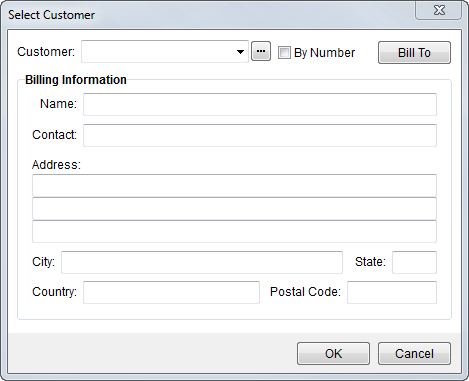
The Select Customer screen allows a user to choose an alternate customer to send an invoice to and allows the user to select a different billing address for the customer.
Figure 13: Select Customer dialog
The following table describes the fields and functions available within the Group Options screen.
|
Field/Function |
Description |
|
Customer |
Select a customer from the list defined within Microsoft
Dynamics GP. Users can use the Customer Find ( Users are prevented from updating this field unless the Remit-To of the invoice is set to a van line or the Invoice Address Manual Flag is set within System Wide Options. |
|
Bill To |
This option allows the user to access the Choose Billing Address screen to select a different mailing address. |
|
Billing Information |
The contact information and address of the customer display in this section. |
|
|
OK (Alt+O) The function keeps the changes made and closes the screen. |
|
|
Cancel (Alt+C) This function closes the screen without adding a group. |
 ) to locate and select a customer as
well. The By Number option causes the identification number
of the customer to display instead of the customer name.
) to locate and select a customer as
well. The By Number option causes the identification number
of the customer to display instead of the customer name.
