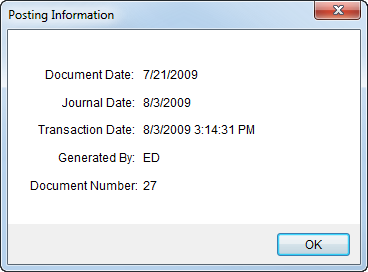
Users can view details of a posted item within the Posting Information screen, available through the following (in Edit mode):
Add Third Party Item (Revenue Entry)
Figure 23: Posting Information
The following table describes the data listed in the Posting Information dialog.
|
Field |
Description |
|
Document Date |
The creation date of the MoversSuite document related to the transaction displays in this field (in MM/DD/CCYY format).
Note: The Document Date is set when Generating Transactions.
|
|
Journal Date |
The effective posting date of the transaction displays in this field (in MM/DD/CCYY format).
Note: The Journal Date is set when Generating Transactions.
|
|
Transaction Date |
The actual generation date of the MoversSuite transaction displays in this field (in MM/DD/CCYY HH:MM:SS format). |
|
Generated By |
The name of the MoversSuite user that performed the posting displays in this field. |
|
Document Number |
The MoversSuite document number linked to the posted transaction for the order displays in this field. |
|
|
OK This function closes the screen. |
