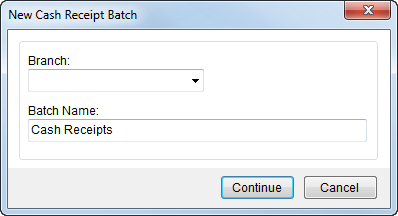
Users will need to select a branch and enter a name for all new batches created through Cash Receipts within the New Cash Receipt Batch screen.
Figure 2: New Cash Receipt Batch screen
The following table describes the fields and functions available within the New Cash Receipt Batch screen.
|
Field/Function |
Description |
|
Branch |
Select a Branch from the list of records defined in Branch Setup. This is the branch affected by transactions generated within Cash Receipts and Payment Management. The branch is Only branches assigned to the user within Personnel Setup will be available. |
|
Batch Name |
Enter the name of the batch used to associate receipts in Cash Receipts and for processing within Payment Management (up to 30 characters). Initially, the Batch Name will be “Cash Receipts,” which a user can update. |
|
|
Continue Press Continue to proceed with creating the new batch record. |
|
|
Cancel This function discards the request to create a new batch record. |

