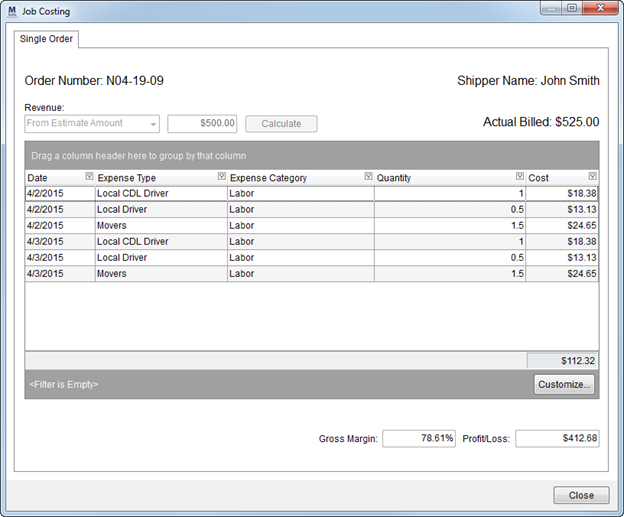
Use the Job Costing window available through the Tools Menu to calculate the anticipated revenue of local service requests for an order. The purpose behind Job Costing is to provide an estimate of how much services cost the company before staff records revenue.
MoversSuite takes costing data assigned to an order through containers, personnel, and other expenses and uses this information to calculate estimated gross margin and profit or loss on an order. Users, such as dispatchers, can use the Job Costing data to assist in assigning crew, equipment, and materials on Local Services in a manner that contributes to optimizing revenue.
Personnel in charge of estimating and revenue can also access the Job Costing screen for and order to enhance their workflow targets.
Figure 41: Job Costing window
The screen offers two tabs: Single Order tab providing costing data for the order currently opened in MoversSuite; and the Compare Orders tab that allows you to view costing data for a specific date range and/or branch assignment.
|
Notes |
|
Job Costing is a separate window from MoversSuite, therefore you can work concurrently in both MoversSuite and within Job Costing. |
|
When you switch orders in MoversSuite, the data within the Single Order tab updates to reflect the current order being viewed. |