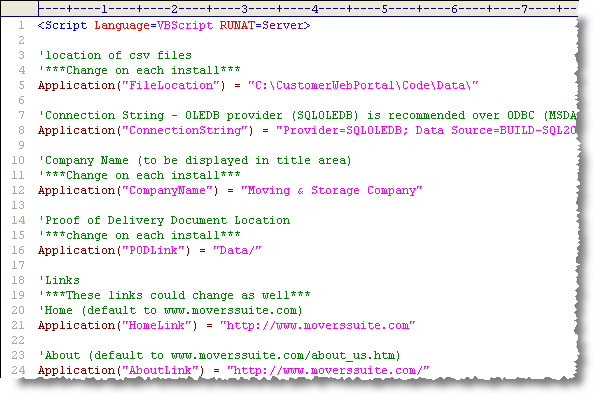
MoversSuite Professional Services will deploy and install the Customer Web Portal application. They will also provide initial run-time settings needed by the Customer Web Portal defined within the global.asa file. This file resides in the root directory of where the Customer Web Portal files installed to and defines variables used globally by the application as described in the table below.
Figure 33: Global.asa file
The following table describes the variables set within the global.asa file. Users can define and use their own variables in addition to those provided.
Note:
Use a text editor such as Notepad to modify this file.
|
Variable |
Description |
|
FileLocation |
Contains the physical location of where data files used by the Customer Web Portal can be stored and accessed. Specifically, the FileLocation folder contains Common Separated Values (CSV) files used by the download function available from search pages. Refer to Account Representative Access for usage. |
|
ConnectionString |
Contains a text string referencing the OLEDB provider data needed to open the MoversSuite database. The connection string will need to contain the following settings: Provider Data Source Initial Catalog Integrated Security |
|
CompanyName |
The text entered for this setting will appear on many pages in the Customer Web Portal as the name of the moving company. |
|
PODLink |
This setting contains a subdirectory name where the Customer Web Portal can access the Proof of Delivery Documents (POD). To reference the same folder as the FileLocation setting, enter “Data/” here. See Customer Web Portal Setup and Administrationfor usage. |
|
HomeLink |
Enter the URL that will be referenced when the user select the Home button within the Customer Web Portal. This link will typically navigate the user back to the home page of the Customer Web Portal. Example: “login.asp” |
|
AboutLink |
Enter the URL that will be referenced when the user selects the About button within the Customer Web Portal. Example: “http://www.movingcompany.com” |
|
ContactLink |
Enter the URL as the link behind the Contact button within the Customer Web Portal. Examples: “mailto:info@movingcompany.com” “http://www.movingcompany.com/contact.html” |
|
HelpLink |
Enter the URL as the link behind the Help button within the Customer Web Portal. Examples: “mailto:info@movingcompany.com” “http://www.movingcompany.com/contact.html” |
|
DesCityLink |
Enter the URL as the link behind the Destination City button within the Customer Web Portal. Example: “http://www.neighborhoodplace.com/” |
|
NewSchoolLink |
Enter the URL as the link behind the Find a New School button within the Customer Web Portal. Example: “http://www.schoolmatch.com/ |
|
ChangeAddressLink |
Enter the URL as the link behind the Change of Address button within the Customer Web Portal. Example: “http://www.moving.com/tools/change-of-address/index.asp” |
|
UtilitiesSetupLink |
Enter the URL as the link behind the Setting Up Utilities button within the Customer Web Portal. Example: “http://www.moving.com/coupons/home-services/utilities.asp” |
|
MovePetLink |
Enter the URL as the link behind the Move Your Pet button within the Customer Web Portal. Example: “http://www.petswelcome.com/milkbone/petmvframe.html” |
Once changes have been made to the global.asa file they will become effective immediately.