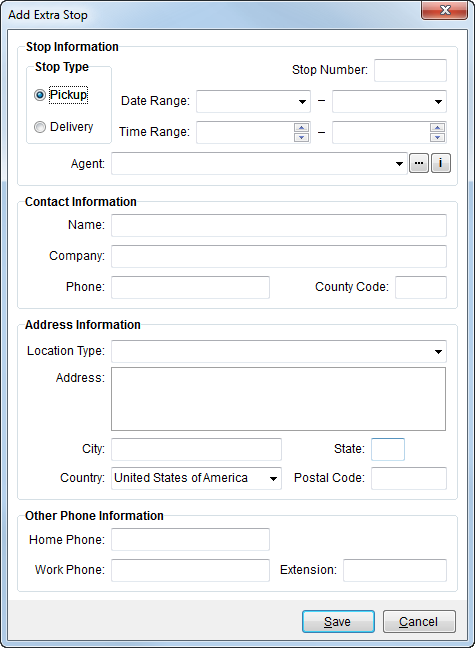
Use the Add Extra Stop screen to define a new, additional stop associated to an order. This screen is available through Extra Stops and through the Advanced > Add Address function in Add Local Service.
Figure 5: Add Extra Stop screen
The following table describes the fields and functions available within this screen.
|
Field |
Description |
|
P/D |
Defines whether the stop will be a pickup (P) or delivery (D). |
|
Stop Number |
Record location within the sequence of stops assigned to this order. The numeric value entered here must be unique to the pickup and delivery and represents the location of the record within the listing and the order in which the records will be exported to a third party application. The letter “P” pre-appends the pickup number and the letter “D” pre-appends a delivery stop number, as visible with Extra Stops data grid. Users can change this number by editing an existing record. |
|
Date Range |
Requested stop range for the pickup or delivery. See Date Fields for more information. |
|
Time Range |
Requested stop times of the pickup or delivery. See Time Fields for more information. |
|
Agent |
Select an agent for the order from the list of those defined within Agent Setup. The Agent Find option is available to assist the selection process and the Agent Information screen provides a user with read-only data for a selected agent. Selecting an agent will populate the contact and address data for the stop, which a user can update. |
|
Contact Information |
|
|
Name |
Enter the contact person at the stop location (up to 50 characters). |
|
Company |
Enter the name of the company at the stop location (up to 50 characters). |
|
Phone |
Enter the phone number of the contact person. See Phone Number Entry for more information. |
|
County |
County code or name associated to the company (up to 32 characters). |
|
Address Information |
|
|
Location Type |
Selected type associated to the stop. Refer to SIRVA sHub Integration Setup and Administration and Address Location Type Setup topics for more information. |
|
Address |
Enter the physical location of the stop (up to 256 characters for up to 3 lines). |
|
City |
Enter the city of the stop location (up to 26 characters). |
|
State |
Enter the state of the stop location (up to 2 characters). |
|
Country |
Select the stop country from the available list. |
|
Postal Code |
Zip code of the stop location (up to 10 characters). |
|
Other Phone Information |
|
|
Home Phone |
Home phone number of the contact associated to the extra stop. See Phone Number Entry for more information. |
|
Work Phone and Extension |
Work phone number and extension of the contact associated to the extra stop (up to 4 characters). |
Fields appearing in red are required.