Any scheduled message that has not already been sent can be deleted. Deleted a Scheduled Message deletes the message from MSWeb Messages > Conversations and MSWeb Global Messages for all subscribers.
To delete a scheduled message:
1. Check the “Show scheduled messages” option above messages. This lists all message in the message timeline.
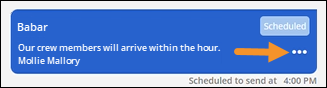
2. Select the message to be deletedted and click the three dots to on the scheduled message to be deleted.
Figure 251: Click ellipses to open menu.
3. From the opened menu, choose “Delete Scheduled Message.”
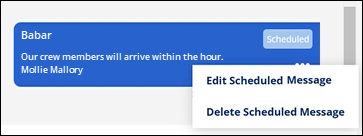
Figure 252: Use "Delete Scheduled Message" only on messages that have not yet been sent.
4. A confirmation appears and choose “Yes” to continue deleting the message. Click “No” to cancel the request and the message remains scheduled.
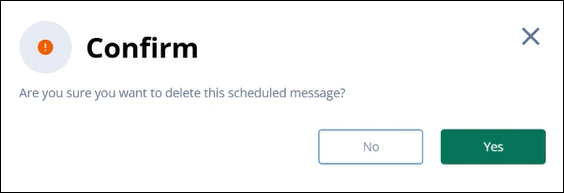
Figure 253: Confirmation message
RELATED INFORMATION: