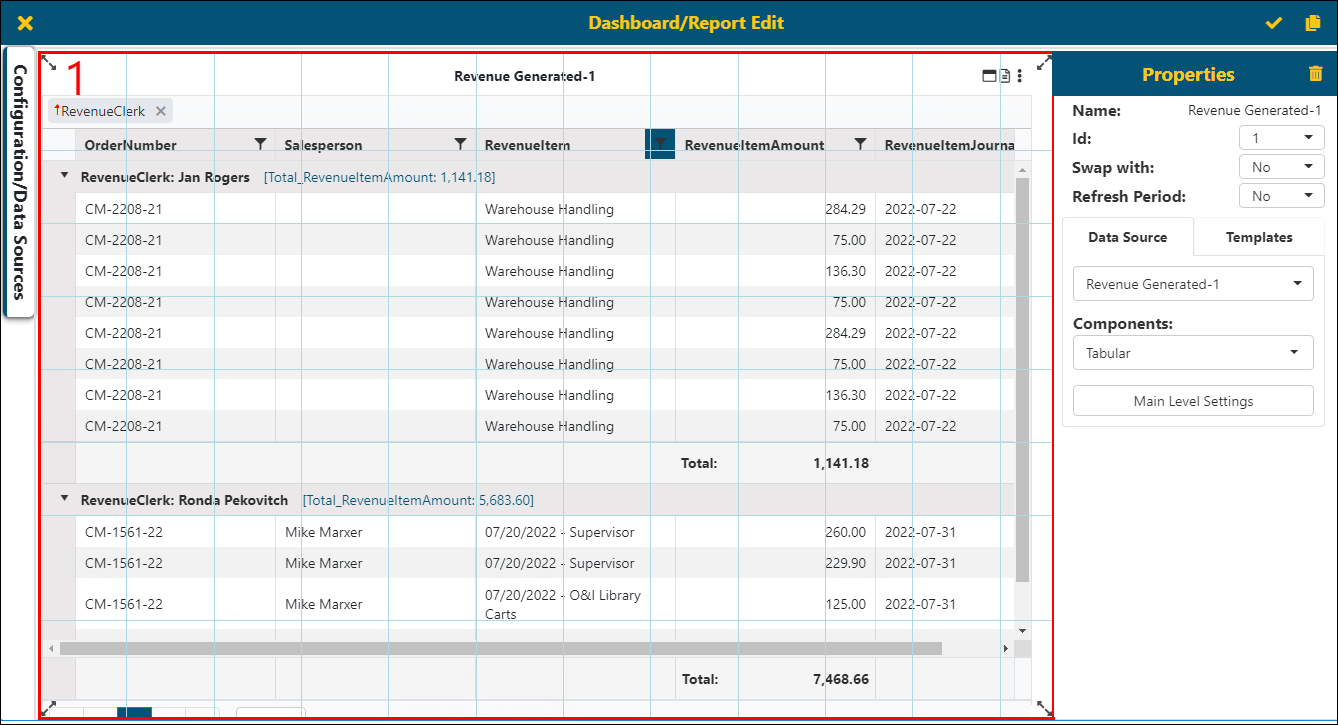
When viewing this page on an existing report, it will be titled with the report name. The Dashboard/Report Edit screen is used when:
•Creating a new report: see BI Tool Create a Report
•Editing an existing report: see BI Tool Edit a Report
•Duplicating a report: see BI Tool Duplicate Report
•Organizing the report: BI Tool Dashboard/Report Placement
Dashboard/Report Edit contains the following areas on its screen:
|
Area |
Located |
More Information |
|
Dashboard/ Report Placement |
The area with the blue lined grid |
|
|
Properties |
On the right side of the screen |
|
|
Configuration/Data Sources |
Tab on the left of the screen |
Figure 91: Dashboard/Report Edit screen
The icon functionalities for the Dashboard/Report Edit screen are:
|
Description | |
|
|
Save This will save the report/dashboard. |
|
|
Save As This will allow the user to copy this report/dashboard to a different name. See BI Tool Duplicate Report for details. |
|
|
Close Click to exit out of the BI Tool Dashboard/Report Edit screen without saving any of the changes made. This is useful if the user would like to try different Component settings but not save them. |


