MoversSuite Administration > Claims > Claim Damage Type
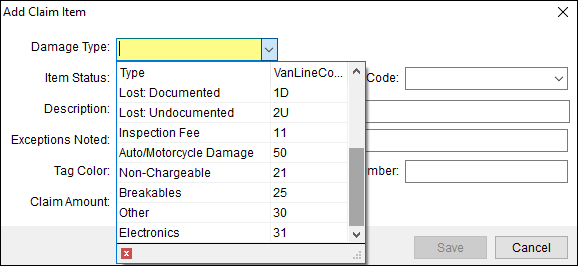
Use this setup to define the values available within the Damage Type field in Add Claim Item.
Figure 60: Damage Type options within Add Claim Items screen.
This is an example of a Claim Damage Type Setup record. This record provides the option “Breakables” within the Damage Type dropdown, as shown in the dropdown within Figure 60.

To add a new Damage Type option:
1. At the top of the Claim Damage Type Setup screen, use Click here to add new Claim Damage Type.
2. Enter the name of the Damage Type within Claim Damage Type.
3. Enter the corresponding Van Line Code from your Van Line.
3. Click Add to save.

The technical table lists details for each field.
|
Field |
Description |
|
Claim Damage Type |
Provide a description for the values available within the Damage Type field in Add Claim Item (up to 128 characters). Examples: Appliance Broken Carpet Missing Lost (documented) Lost (undocumented) Upholstery Damage Vehicle Wall Water Damage
|
|
Van Line Code |
Associate this record with an external code required when exchanging data with a third party application (up to 12 characters). |
RELATED INFORMATION: