MoversSuite Administration > Administration > System Wide Options
Use this setup to define various global MoversSuite settings.
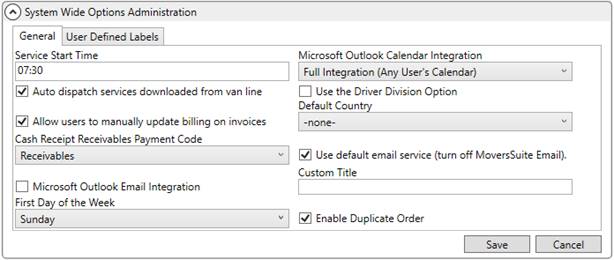
Figure 24: System Wide Options
Technical Field Information
|
Field |
Description |
|
General tab |
|
|
Service Start Time |
Establish the default service start time (in 24-hour Military Time). If a service is created through Add Local Service without a service time, then this is the default assigned to that service when assignments are made in Local Dispatch and when establishing service times through the Set Service Time function. |
|
Microsoft Outlook Calendar Integration |
This setting controls the functionality behind Microsoft Outlook and related calendar options. See Microsoft Outlook Calendar Integration for usage. The following options are available:
-none- Same as the Turned Off option
Turned Off (No Calendar Access Whatsoever) Select this option will disable the Calendar button in MoversSuite. Users will not be able to access any calendar from within the application.
Full Integration (Any User’s Calendar) Enter this option to allow a user access to the calendar of any user set within the field next to the Calendar button in MoversSuite. When a user presses the Calendar button, a new window will open displaying the calendar of the specified person.
Note: This option requires that users be defined within the Microsoft Exchange Server (the server that driver Microsoft Outlook).
Partial Integration (User’s Calendar Only) Entering this option will enable a user to access their own calendar defined for their local system through the Calendar button; the user can only access their own calendar.
|
|
Auto dispatch services downloaded from van line |
Setting this flag will cause the application to automatically generate dispatch for services downloaded from a van line. See Auto Dispatching for more information. |
|
Use the Driver Division Option |
Set this flag to instruct the application to reference the Division set for the driver in their Personnel Setup when their Default Branch matches the branch of the Hauling Agent in Agents. See Divisions Setup and Administration for more information. |
|
Allow users to manually update billing on invoices |
Setting this flag will allow users to update the Billing Information in the Send Invoice To section of a new or supplemental invoice (see New Complete Invoice). If this flag is not set then the Billing Information data will be read-only. |
|
Default Country |
Select a country from the provided list (Country Code Setup) to be used as default when exchanging data with third parties. |
|
Cash Receipt Receivables Payment Code |
Setting this value assigns a default value to the Payment Code on cash receipt items created in Cash Receipts and processed through Payment Management (refer to Detail Processing and Payment Application). This setting does not affect the Payment Code shown when adding the cash receipt through Payment Application, i.e. it is not a default field setting for the Payment Code. The data values defined within Statement Payment Code Setup are available through this setting. |
|
Use default email service (turn off MoversSuite Email) |
Checking this flag instructs the application to use the default mail service that is running on the application server, such as Microsoft Outlook, or the service pointed to through SMTP Setup. Uncheck this flag to turn on MoversSuite Email Service. Email messages generated through the application are sent using the MoversSuite Email Service. |
|
Microsoft Outlook Email Integration |
This flag instructs MoversSuite to utilize the Microsoft Outlook mail service when enabled (checked). When enabled and the Use default email service option is checked, MoversSuite opens the Outlook email form for new mail messages generated through MoversSuite and the message is sent using the Outlook service. When this option is disabled (unchecked), MoversSuite may reference its own mail service or it may reference the mail service defined within SMTP Setup. Refer to MoversSuite Email Service Setup and Administration for more information. |
|
Custom Title |
Entering text in this field instructs MoversSuite to display a message containing the text in the title bar of the MoversSuite application window. The length of this message can be up to 120 characters. The message displays on all stand-alone windows generated through MoversSuite, including MoversSuite Administration, the Document Management Viewer, the Payment Application screen, etc. The format of the title displays as
follows: [APPLICATION NAME] + “-“ + [USERNAME] + “(“ + [CUSTOM TITLE] + “)”
Example: MoversSuite – msuite (custom title text here)
|
|
First Day of the Week |
Set the start of the work week for computing the total hours a person works in a given week. This setting drives the WeekHrs calculation within the crew assignment grid within the Dispatch Center tab in Local Dispatch. If the First Day of the Week is Sunday (system default), then the application computes the total hours worked for services a person is assigned to starting on Sunday and going through the following Saturday. |
|
Enable Duplicate Order |
Setting this flag (default) instructs the application to make the New > Duplicate Order option available within all module. Unchecking this option, removes this option from the New menu. Refer to Create Duplicate Order and to Order-Level Functions for more information. |
|
User Defined Labels tab |
|
|
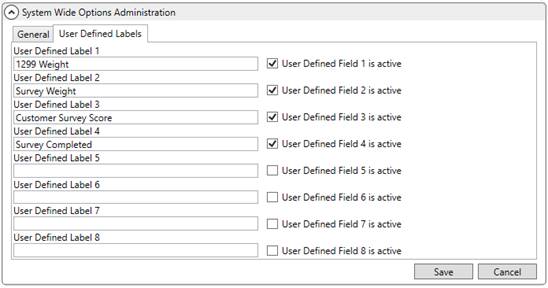
Enter up to 8 custom fields for storing data within the System Specific section within User Defined Fields tab.
Figure 25: User Defined Labels tab
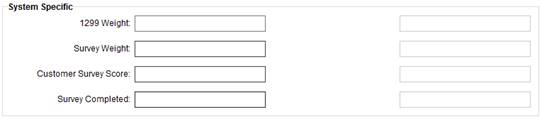
Figure 26: System Specific section within User Defined Fields tab
| |
|
User Defined Label # |
Enter the field label that will display next to the corresponding System Specific field within the User Defined Fields tab in MoversSuite (up to 30 characters). |
|
User Defined Field # is active |
This flag allows you to mark the corresponding label as active (checked) or inactive (unchecked). When checked, the field label set for the corresponding field appears within the User Defined Fields tab in MoversSuite. |
RELATED TOPICS:
Local Dispatch Setup and Administration
Microsoft Outlook Calendar Integration