MoversSuite Administration > Accounting and Financial Services > System Email
You can specify the subject and body of the email message generated through a billing run using this setup.
There are two possibly email messages created through a billing run. One for an invoice on the billed item and the other for the cash receipt generated for any Recurring Electronic Payments that may have been processed as well.
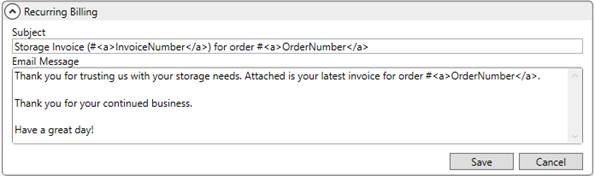
You can set the text of the message emailed for invoice through the Recurring Billing section.
Figure 30: Recurring Billing section within System Email Setup
Set the text of the message sent out for cash receipts associated to Recurring Electronic Payments through the Recurring Cash Receipts section.
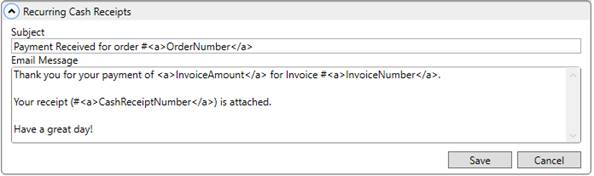
Figure 31: Recurring Cash Receipts section within System Email Setup
You have the ability to insert text place holders that the application replaces with the corresponding data when the email message is created.

Figure 32: Place holder selector
The application provides four place holders. Copy the entire content of the place holder including the beginning anchor <a> and ending anchor </a> and cut and paste it into the subject or message body.
The following table describes the place holders available to insert into the System Email.
|
Place Holder |
Description |
|
<a>CashReceiptNumber</a> |
This place holder only works for the Recurring Cash Receipt message. It is replaced with the cash receipt number generated for Recurring Electronic Payments associated to a Recurring Billing and Storage run. |
|
<a>InvoiceAmount</a> |
This place holder only works for the Recurring Billing message. It is replaced with the amount of the invoice generated for Recurring Billing and Storage run. |
|
<a>InvoiceNumber</a> |
This place holder only works for the Recurring Billing message. It is replaced with the invoice number generated for Recurring Billing and Storage run. |
|
<a>OrderNumber</a> |
This place holder is replaced by the Order Number associated to the Recurring Billing and Storage run. |
The system utilizes the MoversSuite Email Service to send out the email messages. However, your company can also utilize SMTP Setup to have the emails generate from a different service, such Microsoft Outlook.