The System Location setting within Report Setup and within Letter Template Properties allows your company to determine which report generates through pre-set locations within MoversSuite, such as the Print Label button on the Name, Address, Phone tab or the invoice reports available through Recurring Billing Generation.
The following table lists the available System Location values and describes the functionality it represents. Items denoted with an asterisk (*) are menu items that allow multiple reports assigned to the type.
|
System Location |
Location |
|
Cash Receipt |
Cash Receipts > Print Receipt |
|
Claims Report/Letters* |
Claims > Reports/Letters |
|
Commission Statement Report |
Commission Statement Management > Create New Statement/View |
|
Commission Statement Summary Report |
Commission Statement Management > Create New Statement/View |
|
Customer Statement Report |
Generate Statement > Generate Reprint Statements > Generate |
|
Deposit Report |
Batch Management > Deposit Report |
|
Generate Transactions Report |
Detail Processing > Generate Transactions |
|
International Forms* |
Shipping Information > Forms |
|
Military Forms* |
Military/Government > Military Forms |
|
Print Label Report* |
Name, Address, Phone > Print Label |
|
Quotes Reports/Letters* |
Quote > Reports/Letters |
|
Recurring Billing Invoice* |
Recurring Billing Generation > Invoice Report |
|
Revenue Entry Invoices |
EDI Customer Setup > Invoice Report (menu) New Complete Invoice > Invoice Report (menu) |
|
Van Line Distributions Report |
Payment Management > VL Distributions |
|
Work Ticket Report* |
Dispatch Center > Work Ticket |
Menu System Locations
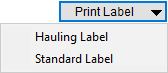
Several System Location values can have multiple reports assigned to them. For example, several reports can list under the Print Label button within the Name, Address, Phone tab.
Figure 10: Print Label meu from Name, Address, Phone tab
You can assign multiple Report Setup records to the following System Locations.
Claims Reports/Letters
International Forms
Military Forms
Print Label Report
Quotes Reports/Letters
Recurring Billing Invoice
Work Ticket Report
Letter System Locations
You can assign the following System Location values to reports with a Report Type of “Letters” (Report Setup) allowing them to open documents containing Bookmarks. Additionally, this list is what is available for options for documents with a Report Type of “MoversSuite Letter,” which is a type managed through Letter Template Properties.
Claims Reports/Letters
International Forms
Military Forms
Print Label Report
Quotes Reports/Letters
Link report and letter documents to the Reports/Letters menu through the Report System Location setting of “Claims Letters/Reports.”
Provide user access to the Claims Out of Balance Report through Report Setup and user Report Profile assignments.
Define letter and form documents available to this module through Letter Management.